Unlock a world of possibilities! Login now and discover the exclusive benefits awaiting you.

Announcements
Share your agentic AI experience, learn from others, and earn a new badge: Put Agentic AI to Work
- Qlik Community
- :
- Forums
- :
- Analytics & AI
- :
- Products & Topics
- :
- App Development
- :
- Drill down in Qliksense
Options
- Subscribe to RSS Feed
- Mark Topic as New
- Mark Topic as Read
- Float this Topic for Current User
- Bookmark
- Subscribe
- Mute
- Printer Friendly Page
Turn on suggestions
Auto-suggest helps you quickly narrow down your search results by suggesting possible matches as you type.
Showing results for

 khadar
Contributor III
2022-02-17
01:32 AM
- Mark as New
- Bookmark
- Subscribe
- Mute
- Subscribe to RSS Feed
- Permalink
- Report Inappropriate Content
Drill down in Qliksense
Hi Team,
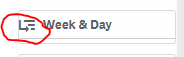
can you anyone help me on how to remove the drilldown Icon. i have created drill down for Week and day as dimension.
I am showing it on filter plane, I want o disable the icon which is populating on it.
928 Views
1 Reply

 chris_djih
Creator III
2022-02-17
03:31 AM
- Mark as New
- Bookmark
- Subscribe
- Mute
- Subscribe to RSS Feed
- Permalink
- Report Inappropriate Content
Since this is intended behaviour, there is no official way to do this?
It ilustrates your users, that this is a drill down dimension and not a normal one- so they don't get confused if the dimension changes when they make a selection in the first dimension.
The only way to "hide" this is cheating around with CSS, i guess. But i haven't done this, so you need to find out by yourself.
If you found help, mark the correct answer and give some likes to ALL contributors, that tried to help.
901 Views
