Unlock a world of possibilities! Login now and discover the exclusive benefits awaiting you.

- Qlik Community
- :
- Forums
- :
- Analytics & AI
- :
- Products & Topics
- :
- App Development
- :
- Incorrect average in totals line for pivot table
- Subscribe to RSS Feed
- Mark Topic as New
- Mark Topic as Read
- Float this Topic for Current User
- Bookmark
- Subscribe
- Mute
- Printer Friendly Page

 mikegrattan
- Mark as New
- Bookmark
- Subscribe
- Mute
- Subscribe to RSS Feed
- Permalink
- Report Inappropriate Content
Incorrect average in totals line for pivot table
I'm using the following formula:
Avg(Aggr(Count(Distinct CaseNumber), Warehouse,Year,Date))
The pivot table comes out like this:
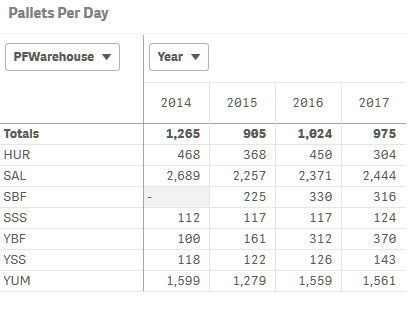
When I try to validate the totals line in Excel, I am getting different numbers:
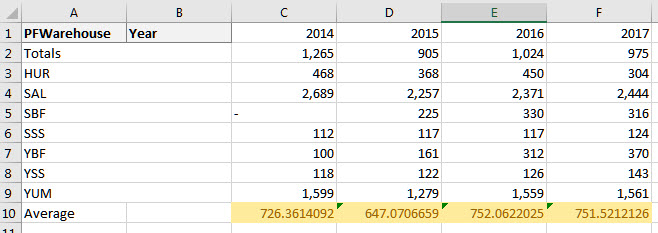
I am currently hiding Nulls in this table for Warehouse. PFWarehouse is a calculated master dimension:
=If(Match(Warehouse,'HUR','SAL','SSS','SBF','YUM','YBF','YSS'),Warehouse,Null())
If I do not exclude Nulls from the pivot table I get the following data:
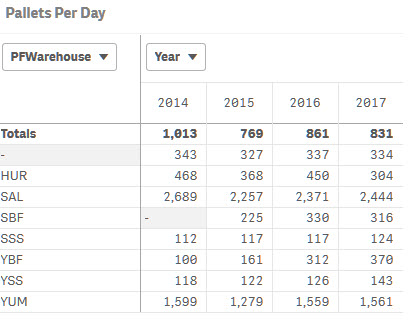
Qlik is adjusting the totals, so I don't think the Null warehouse is throwing this off. Perhaps my formula needs some fine tuning?
Accepted Solutions

 sunny_talwar
- Mark as New
- Bookmark
- Subscribe
- Mute
- Subscribe to RSS Feed
- Permalink
- Report Inappropriate Content
May be try this
Avg(Aggr(Avg(Aggr(Count(Distinct CaseNumber), Warehouse,Year,Date)), Warehouse, Year))
sunny_talwar
- Mark as New
- Bookmark
- Subscribe
- Mute
- Subscribe to RSS Feed
- Permalink
- Report Inappropriate Content
Date is not one of the dimension, why use it in Aggr() function.... May be this
Avg(Aggr(Count(Distinct CaseNumber), Warehouse,Year))
mikegrattan
- Mark as New
- Bookmark
- Subscribe
- Mute
- Subscribe to RSS Feed
- Permalink
- Report Inappropriate Content
Date is not in the pivot table, but I want a daily average of pallets per warehouse.
sunny_talwar
- Mark as New
- Bookmark
- Subscribe
- Mute
- Subscribe to RSS Feed
- Permalink
- Report Inappropriate Content
In that case, I think your row level numbers might not be correct.... you probably should use Avg(Aggr(Count(Distinct CaseNumber), Warehouse,Year,Date)) for your pivot table also
mikegrattan
- Mark as New
- Bookmark
- Subscribe
- Mute
- Subscribe to RSS Feed
- Permalink
- Report Inappropriate Content
I'm not sure I understand what you're saying. I am using that formula in my pivot table. I just don't have the Date dimension showing in my pivot table.
If I add Date to the pivot table either as a row or a column I am still seeing the same numbers at the row level and in the Totals row.
sunny_talwar
- Mark as New
- Bookmark
- Subscribe
- Mute
- Subscribe to RSS Feed
- Permalink
- Report Inappropriate Content
May be try this
Avg(Aggr(Avg(Aggr(Count(Distinct CaseNumber), Warehouse,Year,Date)), Warehouse, Year))
mikegrattan
- Mark as New
- Bookmark
- Subscribe
- Mute
- Subscribe to RSS Feed
- Permalink
- Report Inappropriate Content
Yes, much better. Thank you!
sunny_talwar
- Mark as New
- Bookmark
- Subscribe
- Mute
- Subscribe to RSS Feed
- Permalink
- Report Inappropriate Content
Just better, not perfect 
mikegrattan
- Mark as New
- Bookmark
- Subscribe
- Mute
- Subscribe to RSS Feed
- Permalink
- Report Inappropriate Content
Well...actually it is perfect! 
sunny_talwar
- Mark as New
- Bookmark
- Subscribe
- Mute
- Subscribe to RSS Feed
- Permalink
- Report Inappropriate Content
I am glad it worked out
