Unlock a world of possibilities! Login now and discover the exclusive benefits awaiting you.

- Qlik Community
- :
- Forums
- :
- Analytics & AI
- :
- Products & Topics
- :
- App Development
- :
- Measure as Dimension
- Subscribe to RSS Feed
- Mark Topic as New
- Mark Topic as Read
- Float this Topic for Current User
- Bookmark
- Subscribe
- Mute
- Printer Friendly Page

 danimelo1
- Mark as New
- Bookmark
- Subscribe
- Mute
- Subscribe to RSS Feed
- Permalink
- Report Inappropriate Content
Measure as Dimension
Hi Qlik experts,
I know the difference between measure and dimension. But is it possible to convert a measure into dimension? I need this because I want to put two measures in a bar char or stacked.
I have a measure name, Number of positions, and another measure named Number of position filled by talents employee. So I want to represent it as a bar char, so 1 bar would be the number of positions and the other one would be number of positions filled by talents employees, but of course as they are measures, I don't know how to convert or represent it as a bar chart.
Any ideas?
Regards
- Tags:
- bar char
Accepted Solutions

 luismadriz
- Mark as New
- Bookmark
- Subscribe
- Mute
- Subscribe to RSS Feed
- Permalink
- Report Inappropriate Content
Hola Daniel,
They still look like measures. If you want all positions and employees in a bar chart you could just put them there as measures and use a fake dimension such a word like ='Total' so you'll have both represented in a chart.
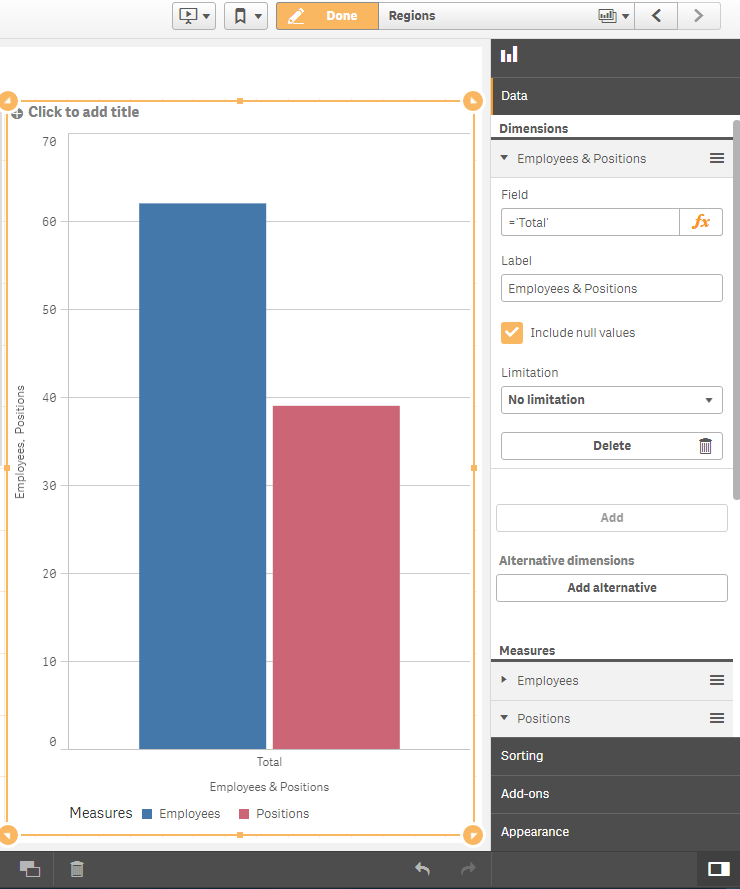
If I'm way off, please attached an image of what you'd like the chart to look like,
Cheers,
Luis

- Mark as New
- Bookmark
- Subscribe
- Mute
- Subscribe to RSS Feed
- Permalink
- Report Inappropriate Content
this may not be a solution, but you can try workaround like using a combo chart and presenting the desired measure in secondary Axis .
luismadriz
- Mark as New
- Bookmark
- Subscribe
- Mute
- Subscribe to RSS Feed
- Permalink
- Report Inappropriate Content
Hola Daniel,
They still look like measures. If you want all positions and employees in a bar chart you could just put them there as measures and use a fake dimension such a word like ='Total' so you'll have both represented in a chart.
If I'm way off, please attached an image of what you'd like the chart to look like,
Cheers,
Luis