Unlock a world of possibilities! Login now and discover the exclusive benefits awaiting you.

- Qlik Community
- :
- Forums
- :
- Analytics & AI
- :
- Products & Topics
- :
- App Development
- :
- Problem facing when using Above(), Multi Dimension
- Subscribe to RSS Feed
- Mark Topic as New
- Mark Topic as Read
- Float this Topic for Current User
- Bookmark
- Subscribe
- Mute
- Printer Friendly Page

- Mark as New
- Bookmark
- Subscribe
- Mute
- Subscribe to RSS Feed
- Permalink
- Report Inappropriate Content
Problem facing when using Above(), Multi Dimension
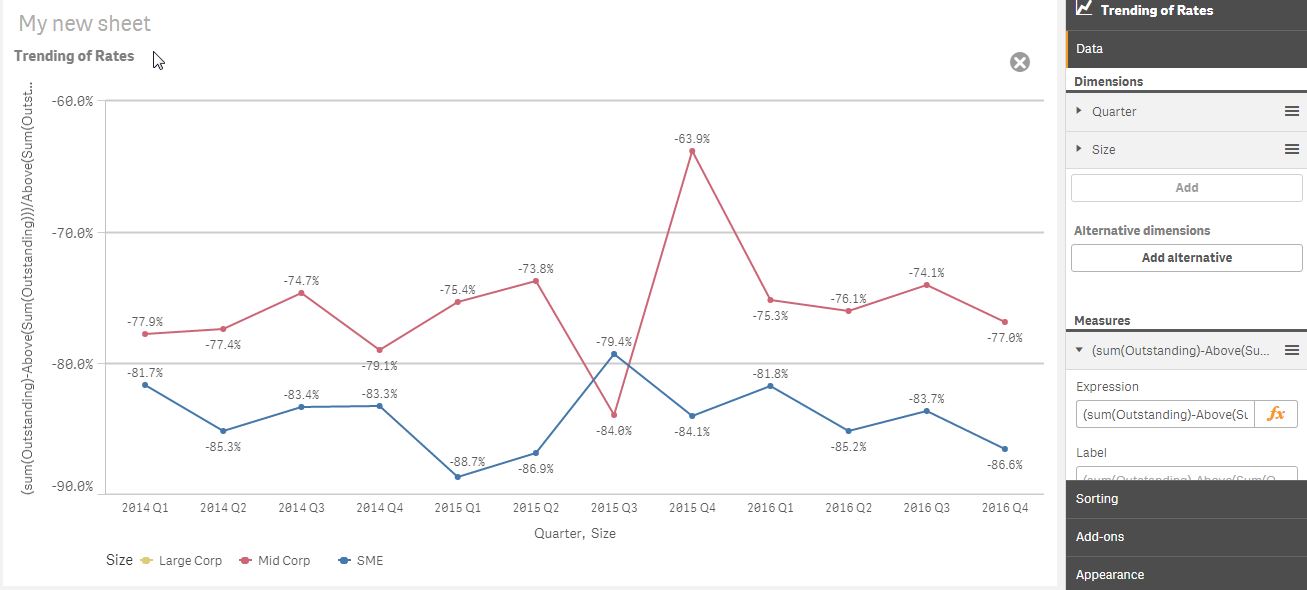
As you can see from the picture, the line for "Large Corp" disappeared because of the usage of Above function.
I want to specific the calculation using above function refer to dimension "Quarter" and then split by Dimension "Size".
Is there any solution for this?
This is the formula of measure : (sum(Outstanding)-Above(Sum(Outstanding)))/Above(Sum(Outstanding))
Accepted Solutions

 sunny_talwar
- Mark as New
- Bookmark
- Subscribe
- Mute
- Subscribe to RSS Feed
- Permalink
- Report Inappropriate Content
Try this:
Aggr((Sum(Outstanding) - Above(Sum(Outstanding)))/Above(Sum(Outstanding)), Size, Quarter)
sunny_talwar
- Mark as New
- Bookmark
- Subscribe
- Mute
- Subscribe to RSS Feed
- Permalink
- Report Inappropriate Content
Try this:
Aggr((Sum(Outstanding) - Above(Sum(Outstanding)))/Above(Sum(Outstanding)), Size, Quarter)
sunny_talwar
- Mark as New
- Bookmark
- Subscribe
- Mute
- Subscribe to RSS Feed
- Permalink
- Report Inappropriate Content
Or this:
Aggr((Sum(Outstanding) - Above(Sum(Outstanding)))/Above(Sum(Outstanding)), Size, (Quarter, (TEXT, ASCENDING)))
- Mark as New
- Bookmark
- Subscribe
- Mute
- Subscribe to RSS Feed
- Permalink
- Report Inappropriate Content
Thanks a lot. I gt it right.