Unlock a world of possibilities! Login now and discover the exclusive benefits awaiting you.

- Qlik Community
- :
- Forums
- :
- Analytics & AI
- :
- Products & Topics
- :
- App Development
- :
- Re: Qlik Sense NPrinting - Date Fields
- Subscribe to RSS Feed
- Mark Topic as New
- Mark Topic as Read
- Float this Topic for Current User
- Bookmark
- Subscribe
- Mute
- Printer Friendly Page

 gbarrett
- Mark as New
- Bookmark
- Subscribe
- Mute
- Subscribe to RSS Feed
- Permalink
- Report Inappropriate Content
Qlik Sense NPrinting - Date Fields
Hello,
I am creating my first Pixel Perfect report and am bringing in 2 date fields from my app. Within my Qlik Sense script, I am applying Date() and Floor() functions to both fields. Using the fields within a Detail Report they are coming through as numbers and not dates. I tried creating a calculated expression with the GetDate() function and that just returned nothing. When changing the format to Date Time, rather than it return a date in the format specified it returns the literal string that is selected in the format type (returned "MM/dd/yy" for every row). How do I format a date field in Pixel Perfect. Thanks in advanced.

 dwforest
- Mark as New
- Bookmark
- Subscribe
- Mute
- Subscribe to RSS Feed
- Permalink
- Report Inappropriate Content
I have the same issue.
I've seen some references to using a script, but not how.
I've also seen formatting the date in Qlik to make it a string; this is not really viable as I need the value to be a date in the application for other things to function. Besides, date formatting should work in NPrinting; its a pretty basic feature...
gbarrett
- Mark as New
- Bookmark
- Subscribe
- Mute
- Subscribe to RSS Feed
- Permalink
- Report Inappropriate Content
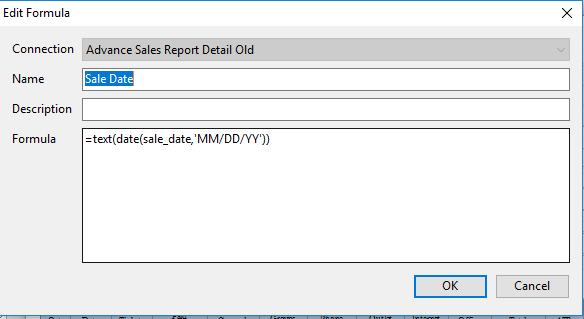
I raised this issue via the Qlik Support portal. It is a known bug and they are working on correcting it. A workaround is to create a formula in Pixel Perfect with this syntax: =text(date(Date_Field,'MM/DD/YY')). Hope this helps for the time being.
dwforest
- Mark as New
- Bookmark
- Subscribe
- Mute
- Subscribe to RSS Feed
- Permalink
- Report Inappropriate Content
Tried that and get an error... Custom function 'text' not found
Using Nprining June 2017 with QlikSense on a Pixel Perfect report
gbarrett
- Mark as New
- Bookmark
- Subscribe
- Mute
- Subscribe to RSS Feed
- Permalink
- Report Inappropriate Content
Are you using it in a formula in the Designer? Not in the formatting for the field, you have to create a specific formula.
dwforest
- Mark as New
- Bookmark
- Subscribe
- Mute
- Subscribe to RSS Feed
- Permalink
- Report Inappropriate Content
No, was trying to do it as a Calculated Field.
Works as formula. Thanks!
.png "kdmarkee") kdmarkee
kdmarkee
- Mark as New
- Bookmark
- Subscribe
- Mute
- Subscribe to RSS Feed
- Permalink
- Report Inappropriate Content
And I can confirm this is still an issue in Sep 2017 NP, but this post was helpful for me as well to learn a work around.
 millerhm
- Mark as New
- Bookmark
- Subscribe
- Mute
- Subscribe to RSS Feed
- Permalink
- Report Inappropriate Content
This is still an issue for me in 2020 and it's infuriating to basically have to duplicate everything as a text(date()) string to get it to display correctly in NP when there is a a built in formatting string that does not work.
In my case, I have a date in a table, so I can't create a Formula - anyone else figured this out?

 PK007
PK007
- Mark as New
- Bookmark
- Subscribe
- Mute
- Subscribe to RSS Feed
- Permalink
- Report Inappropriate Content
Still an issue in 2021. Also have a date within a table, so cannot use the work-around mentioned in this thread. @millerhm have you figured this out yet?
