Unlock a world of possibilities! Login now and discover the exclusive benefits awaiting you.

- Qlik Community
- :
- Forums
- :
- Analytics & AI
- :
- Products & Topics
- :
- App Development
- :
- Substitute a simple if statement with a variable n...
- Subscribe to RSS Feed
- Mark Topic as New
- Mark Topic as Read
- Float this Topic for Current User
- Bookmark
- Subscribe
- Mute
- Printer Friendly Page

 Applicable88
- Mark as New
- Bookmark
- Subscribe
- Mute
- Subscribe to RSS Feed
- Permalink
- Report Inappropriate Content
Substitute a simple if statement with a variable not working
Accepted Solutions
Applicable88
- Mark as New
- Bookmark
- Subscribe
- Mute
- Subscribe to RSS Feed
- Permalink
- Report Inappropriate Content
Hello,
apparently its not a string or number problem.
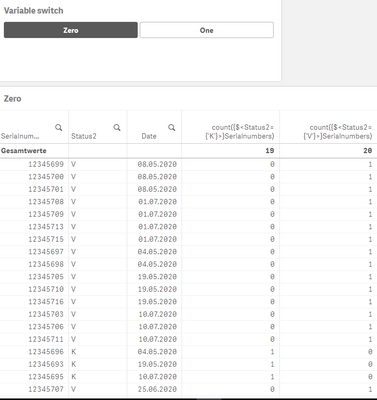
I think its simply how this function displays the counts. Even the set expression already filter K or V. Really makes no sense to me.

 lironbaram
- Mark as New
- Bookmark
- Subscribe
- Mute
- Subscribe to RSS Feed
- Permalink
- Report Inappropriate Content
Hi
you forgot to explain what is not working
Applicable88
- Mark as New
- Bookmark
- Subscribe
- Mute
- Subscribe to RSS Feed
- Permalink
- Report Inappropriate Content
Oh... @lironbaram ,
apparently the Forum had the maintenance session while I posted. Thank you for telling me.
I have following question:
As you know you can also change the title of a straight table with a variable and a switch button dynamically like this:
if(vTest='0', 'Zero','One') That works perfectly , no problem at all.
I now have a straight table with serialnumbers , status and a date :
=if(vTest='0',count({$<Status2={'K'}>}Serialnumbers),count({$<Status2={'V'}>}Serialnumbers)) The table said its invalid. Why its not going to work? Its basically only saying if variable='0' than do this count otherwise the other count.
And I want to add that I need this as a dimension not measure, so that I can also use it as a bar-chart dimension later on.
If I'm using the functions separetely without variable it also works perfectly : count({$<Status2={'K'}>}Serialnumbers) or when using this count({$<Status2={'V'}>}Serialnumbers)

 brunobertels
- Mark as New
- Bookmark
- Subscribe
- Mute
- Subscribe to RSS Feed
- Permalink
- Report Inappropriate Content
Hi
you need to run your variable to make your if statement works so the mesure should be
=if($(vTest)='0',count({$<Status2={'K'}>}Serialnumbers),count({$<Status2={'V'}>}Serialnumbers))
Applicable88
- Mark as New
- Bookmark
- Subscribe
- Mute
- Subscribe to RSS Feed
- Permalink
- Report Inappropriate Content
Hello @brunobertels ,
thx, but doesn't solve the problem. Seems to be another issue. The DSE makes no difference here.
brunobertels
- Mark as New
- Bookmark
- Subscribe
- Mute
- Subscribe to RSS Feed
- Permalink
- Report Inappropriate Content
hi
I assume that you have declared your variable in the control variable panel :
have you test your mesure in a KPI , is the behaviour the same ?
lironbaram
- Mark as New
- Bookmark
- Subscribe
- Mute
- Subscribe to RSS Feed
- Permalink
- Report Inappropriate Content
hi
if your variable is numeric this should work
=if($(vTest)=0,count({$<Status2={"K"}>}Serialnumbers),count({$<Status2={"V"}>}Serialnumbers))

 NitinK7
- Mark as New
- Bookmark
- Subscribe
- Mute
- Subscribe to RSS Feed
- Permalink
- Report Inappropriate Content
Hi
May your varible value is numeric 0 and check 0 as string . Plase write 0 instead of '0' in if condition.
Try like below
=if($(vTest)=0,count({$<Status2={"K"}>}Serialnumbers),count({$<Status2={"V"}>}Serialnumbers))
Applicable88
- Mark as New
- Bookmark
- Subscribe
- Mute
- Subscribe to RSS Feed
- Permalink
- Report Inappropriate Content
Hello,
apparently its not a string or number problem.
I think its simply how this function displays the counts. Even the set expression already filter K or V. Really makes no sense to me.
