Unlock a world of possibilities! Login now and discover the exclusive benefits awaiting you.

- Qlik Community
- :
- Forums
- :
- Analytics & AI
- :
- Products & Topics
- :
- App Development
- :
- Top Customer vs Top Products
- Subscribe to RSS Feed
- Mark Topic as New
- Mark Topic as Read
- Float this Topic for Current User
- Bookmark
- Subscribe
- Mute
- Printer Friendly Page

 samp
samp
- Mark as New
- Bookmark
- Subscribe
- Mute
- Subscribe to RSS Feed
- Permalink
- Report Inappropriate Content
Top Customer vs Top Products
I am planning to achieve below 4th table for Top Customer vs Top Products.
Example: have simple below 3 table charts results for sample Inline data added bottom.
All data in simple tables:
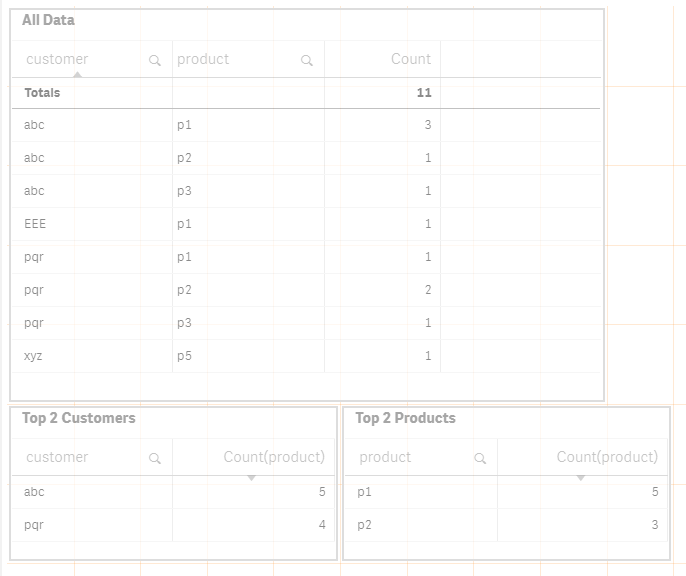
Expected result:

sample data:
custTable:
Load * Inline [
customer, product
'abc', 'p1'
'abc', 'p1'
'abc', 'p1'
'abc', 'p2'
'abc', 'p3'
'pqr', 'p1'
'pqr', 'p2'
'pqr', 'p2'
'pqr', 'p3'
'xyz', 'p5'
'EEE', 'p1'
];
Accepted Solutions

 sunny_talwar
- Mark as New
- Bookmark
- Subscribe
- Mute
- Subscribe to RSS Feed
- Permalink
- Report Inappropriate Content
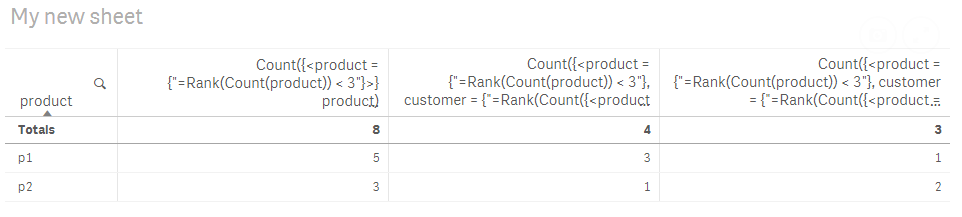
Try these expression
1)
Count({<product = {"=Rank(Count(product)) < 3"}>} product)
2)
Count({<product = {"=Rank(Count(product)) < 3"}, customer = {"=Rank(Count({<product = {""=Rank(Count(product)) < 3""}>} product)) = 1"}>} product)
3)
Count({<product = {"=Rank(Count(product)) < 3"}, customer = {"=Rank(Count({<product = {""=Rank(Count(product)) < 3""}>} product)) = 2"}>} product)

 YoussefBelloum
- Mark as New
- Bookmark
- Subscribe
- Mute
- Subscribe to RSS Feed
- Permalink
- Report Inappropriate Content
Hi,
customer as a dimension
expressions like this:
1st: Count( {<customer= {'abc'} >} product) ==> for TOP1 column
2nd: Count( {<customer= {'pqr'} >} product) ==> for TOP2 column
sunny_talwar
- Mark as New
- Bookmark
- Subscribe
- Mute
- Subscribe to RSS Feed
- Permalink
- Report Inappropriate Content
Try these expression
1)
Count({<product = {"=Rank(Count(product)) < 3"}>} product)
2)
Count({<product = {"=Rank(Count(product)) < 3"}, customer = {"=Rank(Count({<product = {""=Rank(Count(product)) < 3""}>} product)) = 1"}>} product)
3)
Count({<product = {"=Rank(Count(product)) < 3"}, customer = {"=Rank(Count({<product = {""=Rank(Count(product)) < 3""}>} product)) = 2"}>} product)
samp
- Mark as New
- Bookmark
- Subscribe
- Mute
- Subscribe to RSS Feed
- Permalink
- Report Inappropriate Content
top 2 customer names should be dynamic
YoussefBelloum
- Mark as New
- Bookmark
- Subscribe
- Mute
- Subscribe to RSS Feed
- Permalink
- Report Inappropriate Content
Ah ok ! so take Sunny's answer 
samp
- Mark as New
- Bookmark
- Subscribe
- Mute
- Subscribe to RSS Feed
- Permalink
- Report Inappropriate Content
Hi Sunny,
working like charm, can you suggest me hoe to add names dynamically in the 3rd (abc)and 4th(pqr) headers?
sunny_talwar
- Mark as New
- Bookmark
- Subscribe
- Mute
- Subscribe to RSS Feed
- Permalink
- Report Inappropriate Content
Change this value
Count({<product = {"=Rank(Count(product)) < 3"}, customer = {"=Rank(Count({<product = {""=Rank(Count(product)) < 3""}>} product)) = 1"}>} product)
samp
- Mark as New
- Bookmark
- Subscribe
- Mute
- Subscribe to RSS Feed
- Permalink
- Report Inappropriate Content
Hi Sunny.
for your first line:
1) Count({<product = {"=Rank(Count(product)) < 3"}>} product)
I am trying to add my additional filters for your given exp seems syntax is correct but I am not getting expected results, is below exp correct? thanks for your help.
Count({<[Investment Strategy] = {"=Rank(Count({<Type = {'RFI','Database Search','Database Search Follow-Up'},Quarter={'Q1','Q2','Q3'},Year={""$(=Max(Year))""}>} [Investment Strategy]))<11" } > } [Investment Strategy])
