Unlock a world of possibilities! Login now and discover the exclusive benefits awaiting you.

- Qlik Community
- :
- Forums
- :
- Analytics & AI
- :
- Products & Topics
- :
- App Development
- :
- calculated dimension help
- Subscribe to RSS Feed
- Mark Topic as New
- Mark Topic as Read
- Float this Topic for Current User
- Bookmark
- Subscribe
- Mute
- Printer Friendly Page

 Meg00
Meg00
- Mark as New
- Bookmark
- Subscribe
- Mute
- Subscribe to RSS Feed
- Permalink
- Report Inappropriate Content
calculated dimension help
Hi!
I have an issue trying to figure out how to get a stacked bar chart with the following:
measure: count(distinct Person)
Bar: I want the values to be "Number of person with 1 piece", "Number of person with 2 piece", "Number of person with 3 piece", "Number of person with 4 piece"
Stack: Period
| Person | Sum({<TotalFlag = {'0'}>}pieces) | Period |
| Person 1 | 4 | 202101 |
| Person 2 | 2 | 202101 |
| Person 3 | 1 | 202101 |
| Person 4 | 2 | 202101 |
| Person 5 | 2 | 202101 |
| Person 6 | 1 | 202101 |
and the result should look something like this:
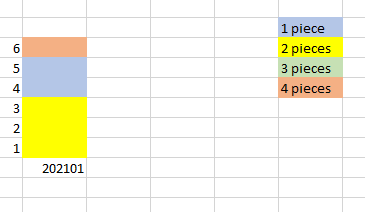
I've tried to create a calculated dimension
=if(Sum({<TotalFlag = {'0'}>}pieces)=1, '1 piece', etc.... but it will not work.
any suggestions?
Sincerely
Meg
Accepted Solutions
Meg00
- Mark as New
- Bookmark
- Subscribe
- Mute
- Subscribe to RSS Feed
- Permalink
- Report Inappropriate Content
Sollution found:
=aggr(Sum({<TotalFlag = {'0'}>}pieces),Person, Period)
Meg00
- Mark as New
- Bookmark
- Subscribe
- Mute
- Subscribe to RSS Feed
- Permalink
- Report Inappropriate Content
Sollution found:
=aggr(Sum({<TotalFlag = {'0'}>}pieces),Person, Period)

 GaryGiles
- Mark as New
- Bookmark
- Subscribe
- Mute
- Subscribe to RSS Feed
- Permalink
- Report Inappropriate Content
You want to take advantage of the Class() function.
The basic structure as a dimension would be:
aggr(Class( Sum({<TotalFlag = {'0'}>} pieces), 1),Person)
Qlik will create bins for your calculation, like '1 <= x < 2','2 <= x < 3', etc.
You can alter the strings with something like this:
=pick(match(aggr(Class( Sum({<TotalFlag = {'0'}>} pieces), 1),Person),
'1 <= x < 2',
'2 <= x < 3',
'3 <= x < 4',
'4 <= x < 5',
'5 <= x < 6',
'6 <= x < 7',
'7 <= x < 8',
'8 <= x < 9'),
'1 piece',
'2 pieces',
'3 pieces',
'4 pieces',
'5 pieces',
'6 pieces',
'7 pieces',
'8 pieces',
'9 pieces')
Hope that helps.
