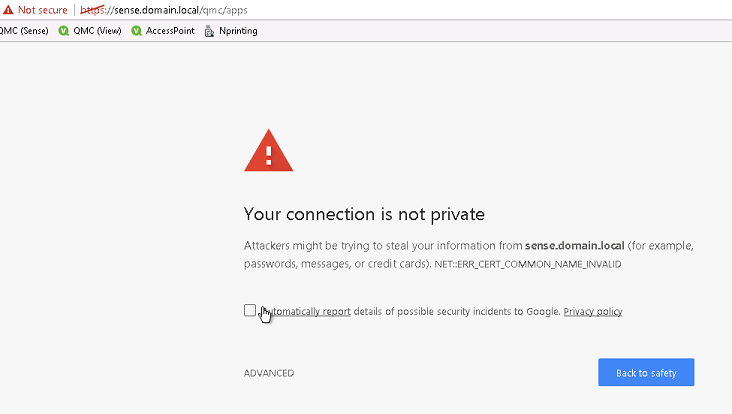
Google Chrome 58 and higher displays a “Your connection is not private” warning when accessing Qlik Sense Hub or QMC.
The same issue might also be seen for other non-Qlik-related HTTPS URLs.
Environment
Qlik Sense Enterprise on Windows
Resolution
The issue can be resolved differently depending on the Qlik Sense version and the certificate authority in use. A temporary solution can be to ignore the browser warning or to use another browser. Permanent solutions depend on the current version of Qlik Sense.
3rd party certificates
Qlik Sense sites that use 3rd party certificates, have to be updated by acquiring an updated certificate from the certificate provider. Please consult local IT team for more guidance on how to apply a certificate update.
Qlik Sense Standard self-signed certificates
Certificates self-signed by Qlik Sense do not contain the “Subject Alternative Name” attribute. A possible solution is to configure Google Chrome to allow certificates issued by local trust anchors that are missing the subjectAlternativeName, which can be done by setting HKEY_CURRENT_USER\Software\Policies\Google\Chrome\ EnableCommonNameFallbackForLocalAnchors= dword :1 in the Windows Registry.
Changes to the Windows registry can lead to severe system problems if not applied accurately.
See attached .reg file as a reference to applying EnableCommonNameFallbackForLocalAnchors in the Windows registry.
If a subjectAltName extension of type dNSName is present, that MUST be used as the identity. Otherwise, the (most specific) Common Name field in the Subject field of the certificate MUST be used. Although the use of the Common Name is existing practice, it is deprecated and Certification Authorities are encouraged to use the dNSName instead.
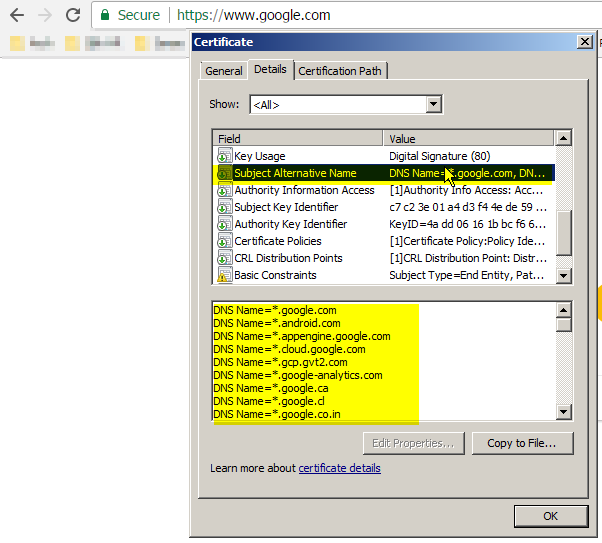
This is an example of a certificate that will work without issue in Chrome 58 or higher. Note the highlighted portions: