End Users may want to decide when their current session to a document refreshes to display new data. This functionality is available out of the box for the Internet Explorer Plugin and the "Open in Server.." option in the Desktop Client, however not in AJAX.
Stop the QlikView Server Service. If you are operating in a cluster, all nodes will have to be stopped, and every node will have its settings.ini changed.
Take a backup of the settings.ini file
Edit the settings.ini file by adding the line ShowRefreshDoc=1
[Settings]
ShowRefreshDoc=1
[...]
Note: Make sure the setting is added after [Settings 7] but before any other section marker [... ]
QlikView Enterprise Management Console
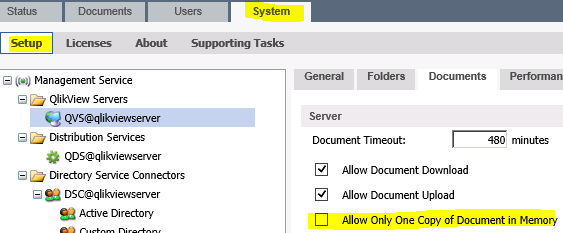
In your Management Console, navigate to System > Setup > QlikView Server - QVS@... > Documents > There disable "Allow only one copy of document in memory"
QlikView Desktop - *.qvw:
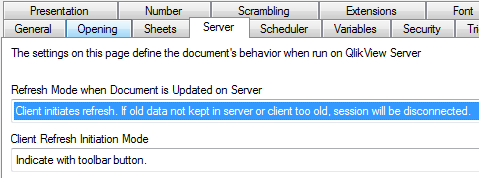
Open the original document. If a Publisher is in use, this would be the Source Document Navigate to Document Properties > Server
Set Refresh Mode to "Client initiates refresh. If old data not kept in server or client too old, session will be disconnected" Note: The meaning of 'client too old' is literally that the client is too old, this is of no concern in 11.20 or later, as this refers to much earlier releases of the product.
Client Refresh Initiation Mode to "Indicate with toolbar button"
Result
After these changes have been applied, a new toolbar icon will be visible across all AJAX client instances.