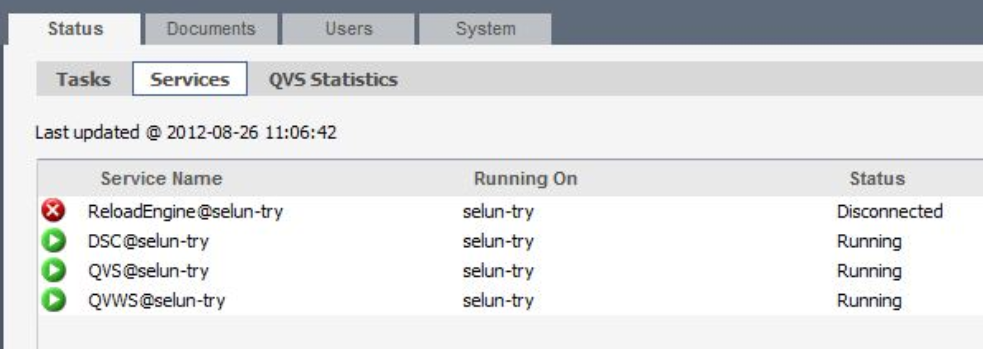
The ReloadEngine is displayed as Disconnected in the QlikView Management Console. Tasks cannot be executed and are listed as unrunnable. Cluster information shows Cluster is down. See Fig 1.
Restart the Distribution Service. Service communication may have been interrupted and needs to be reset.
The account running the Distribution Service must be a member of both the local administrator group and the QlikView Administrators group.
The identical account must be running the other QlikView services. Exception: Certificate Trust is set up between the services. In the case of Certificate Trust, verify that the certificates have been correctly distributed.
Verify that no username and password are configured in the QlikView Management Console > System > Setup > Distribution Service > QDS@node > Login tab. Remove any username or password and click Apply.
To resolve possible communication issues between the services caused by specific machine policies, the name the services communicate with may need to be changed.
Examples:
If on the same machine, the name can be changed to localhost.
If the services are on different machines, change the name to the IP address.
To change the URL of the services to localhost or the IP address, navigate to the individual service in the QlikView Management Console and modify the value in the respective General tab.
Example:
System > Setup > Directory Service Connector > DSC@node > General tab > Modify from "http://SERVERNAME:4730/DSC/Service " to "http://localhost:4730/DSC/Service ".
Then click Apply.
This process can be done in much the same way for the following services:
QlikView Server
Directory Service Connector
QlikView WebServer
Distribution Service (if using Publisher)
If no Publisher license is available, the Reload Engine needs to be modified manually:
Stop the QlikView Management service.
Open the DistributionService.xml file located in C:\ProgramData\QlikTech\ManagementService\QVPR