Unlock a world of possibilities! Login now and discover the exclusive benefits awaiting you.

- Qlik Community
- :
- Support
- :
- Support
- :
- Knowledge
- :
- Support Articles
- :
- Installing Qlik GeoAnalytics Extensions for Qlik S...
- Subscribe to RSS Feed
- Mark as New
- Mark as Read
- Bookmark
- Subscribe
- Printer Friendly Page
- Report Inappropriate Content
Installing Qlik GeoAnalytics Extensions for Qlik Sense Enterprise

 Bjorn_Wedbratt
- Mark as New
- Bookmark
- Subscribe
- Mute
- Subscribe to RSS Feed
- Permalink
- Report Inappropriate Content
Installing Qlik GeoAnalytics Extensions for Qlik Sense Enterprise
May 12, 2021 7:25:15 AM
Apr 5, 2017 10:17:09 AM
Environment:
Qlik GeoAnalytics extensions and connector for Qlik Sense Enterprise is delivered as a zip archive. To install do the following:
- Extract the downloaded GeoAnalyticsForQlikSenseServer-x.x.x.zip archive
- Open Qlik Management Console and go to Extensions
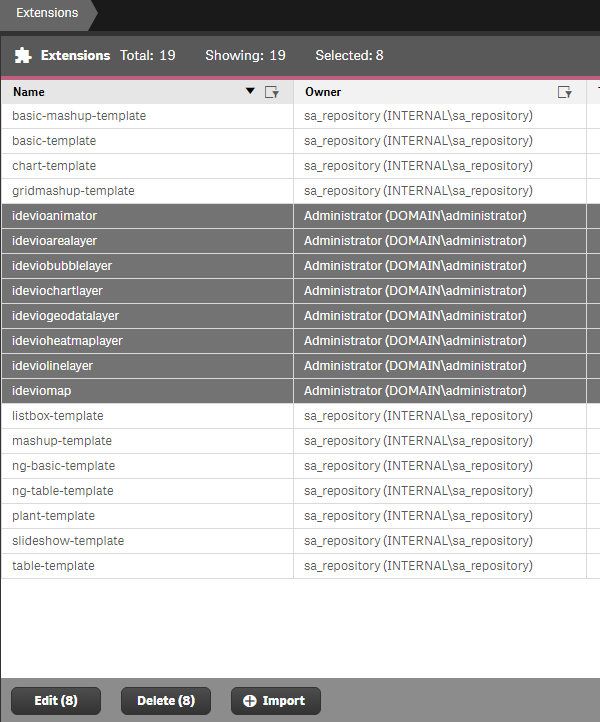
- Delete any previously imported Idevio extensions (idevio*), CTRL+ select to multi-select and press Delete
- Press Import and Choose File
- Locate the extensions in the folder where you previously extracted GeoAnalyticsForQlikSenseServer-x.x.x.zip and import them one by one into Qlik Sense Enterprise
- Once done there should be a total of 8 extensions in Qlik Management Console
- Run GeoAnalyticsSetup_x.x.x.exe located in the folder where you previously extracted GeoAnalyticsForQlikSenseServer-x.x.x.zip
- Accept the license agreement and press Next >
- If not running a local GeoAnalytics server, leave the default server URL and press Next >
This setting can later be changed in IdevioGeoAnalyticsConnector.exe.config file found in C:\Program Files\Common Files\Qlik\Custom Data\QvIdevioConnector\ - Press Install to start the installation process
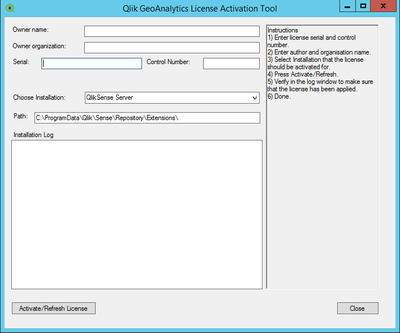
- Once the installation process is finished, the License Activation Tool will be launched automatically. (located in C:\Program Files (x86)\QlikView\GeoAnalyticsLicenseTool)
- Enter your Serial number and Control number
If running a local GeoAnalytics server, use the Serial number and Control number for the GeoAnalytics server to activate the license - Synchronized Persistence: Make sure to select the correct environment, "QlikSense Server". This will ensure license details are written in the correct location
- Qlik Sense Multi node Environment: Run GeoAnalyticsSetup_x.x.x.exe in all Qlik Sense nodes and re start all Qlik sense services.
- Shared Persistence: Make sure to select the environment "Custom Installation" and insert the Extension path. For example, if your root folder is \\myserver\share, insert path \\myserver\share\StaticContent\Extensions\ OR C:\myserver\share\StaticContent\Extensions\
License details for Qlik Sense Enterprise will by default be written into license.js during activation, which can be found in C:\ProgramData\Qlik\Sense\Repository\Extensions\ideviomap\ (Synchronized persistence) or \\myserver\share\StaticContent\Extensions\ideviomap\ (Shared persistence)
License details for GeoAnalytics Connector will by default be written into IdevioGeoAnalyticsConnector.exe.config during activation, which can be found in C:\Program Files\Common Files\Qlik\Custom Data\QvIdevioConnector\ - Press Activate/Refresh license to activate the license
Internet access is not required, but you may receive a red text saying "Check your internet connection" followed by this message in Installation Log. Ignore the message. - Then restart Qlik Sense server, Qlik GeoAnalytics for QlikSense Enterprise is now installed and ready to use



Note: Since the Engine loads connectors (and DSNs) from local resources, it is important to install the GeoAnalytics connector to all nodes with an Engine service active or the GeoAnalytics Connector may not function properly.
Note 2: On successful activation the "Installation Log" will show LEF details for the license, if LEF license server can be contacted. This information is only to verify that the correct license has been applied during activation and is not written down in any LEF.txt or similar.
Reactivating / Changing license
Should you need to reactivate or change the license, use the License Activation tool:
- In Windows Explorer go to C:\Program Files (x86)\QlikView\GeoAnalyticsLicenseTool
- Launch GeoAnalyticsLicenseTool.exe
- Follow the steps above to add your Serial and Control number and reactivate the license
Configuration when running a local GeoAnalytics server
If connecting to a local GeoAnalytics server the URL to the server can be entered during setup or altered afterwards.
- Edit IdevioGeoAnalyticsConnector.exe.config found inC:\Program Files\Common Files\Qlik\Custom Data\QvIdevioConnector\
- Change the setting for "serverURL" to point to your local GeoAnalytics server
- Save the file
- Edit settings.js found in C:\ProgramData\Qlik\Sense\Repository\Extensions\ideviomap\ (Synchronized persistence) or \\myserver\share\StaticContent\Extensions\ideviomap\ (Shared persistence)
- Alter the "server" setting to point to your local GeoAnalytics server (or add it if settings.js is empty)
define({ "server": "http://qlikserver.domain.local" }); - Save the file
- Run the License Activation Tool found in C:\Program Files (x86)\QlikView\GeoAnalyticsLicenseTool
- Enter the Serial number and Control number for your GeoAnalytics server and press Activate/Refresh license to activate the license
Common paths
Extensions
Installation: C:\ProgramData\Qlik\Sense\Repository\Extensions\
Needs to be imported through Qlik Management Console
License file: C:\ProgramData\Qlik\Sense\Repository\Extensions\ideviomap\license.js
Settings file: C:\ProgramData\Qlik\Sense\Repository\Extensions\ideviomap\settings.js
Connector
Installation: C:\Program Files\Common Files\Qlik\Custom Data\QvIdevioConnector
Settings file: C:\Program Files\Common Files\Qlik\Custom Data\QvIdevioConnector\IdevioGeoAnalyticsConnector.exe.config
URL for Geo Server
License key
Licensing tool
Installation: C:\Program Files (x86)\QlikView\GeoAnalyticsLicenseTool
Logs
C:\ProgramData\QlikTech\Custom Data\IdevioGeoAnalyticsConnector\Log