Do not input private or sensitive data. View Qlik Privacy & Cookie Policy.
Skip to main content

Announcements
ALERT: QlikView server communication interruptions following Microsoft Windows Domain Controller security updates

Container chart doesn't show the fullscreen option

No ratings
cancel
Showing results for 
Search instead for 
Did you mean: 
Sonja_Bauernfeind
Digital Support
Digital Support

Container chart doesn't show the fullscreen option

Last Update:

Jul 20, 2022 3:42:17 AM

Updated By:

Sonja_Bauernfeind

Created date:

Mar 13, 2020 6:00:55 AM

The container chart does not show the full-screen option when clicked. 

Resolution


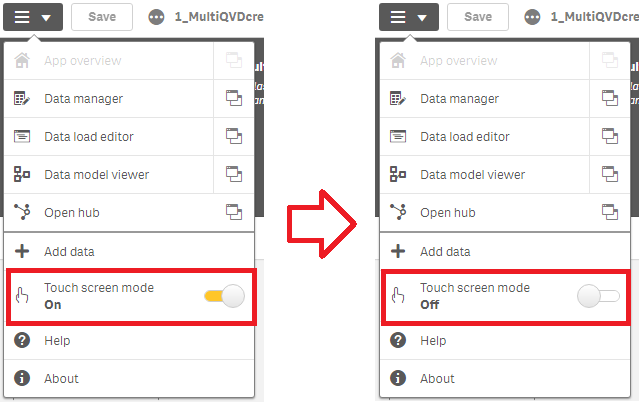
Disable touch screen mode:

  1. To do so, click the menu button in the top left corner of the App
  2. In the menu, toggle Touch screen mode (on/off) 


Disable Touch Screen.png

Labels (1)
Contributors
Version history
Last update:
‎2022-07-20 03:42 AM
Updated by: