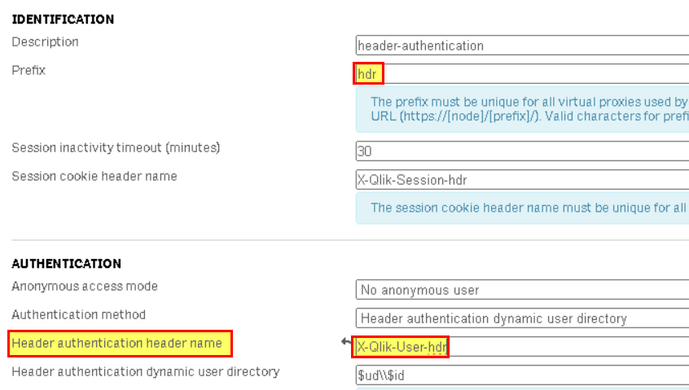
When using "Header authentication" method, after upgrading to latest Qlik Sense Enterprise versions or latest patch, you may encouter error like "400 bad request Invalid header in the request".
From the image above, notice that the request header is “X-Qlik-User-hdr = Domain\administrator" (in this example). Meaning that, in Qlik Sense virtual proxy settings, the "header authentication header name” was set to “X-Qlik-User-hdr".
Resolution
This is working as designed (WAD).
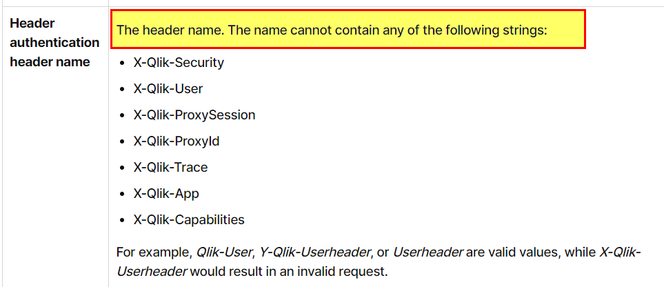
R&D confirmed that, there was a security fix made back in August-September 2023, which disallow header authentication using header names that include "X-Qlik-User" in "header authentication header name".
Thus, if the "Header Authentication" setting was working before the upgrade and then the error "400 bad request Invalid header in the request" occurs after upgrading to latest version of Qlik Sense Enterprise or after installing a patch, please ensure that in the related virtual proxy, "header authentication header name” is not set to something like "X-Qlik-User-*" (Check for example QS Feb 2024 header name restrictions).
Information provided on this defect is given as is at the time of documenting. For up to date information, please review the most recent Release Notes, or contact support with the ID QB-25945 orQB-21731 for reference.
Cause
Product Defect ID: QB-25945, QB-21731 and HLP-15641
We currently use 2021 qlik version. I am required to setup QRS API. our qlik runs in 443 port so according to qlik help docu this comes under virtual proxy. I have setup virtual proxy accordingly but still in postman i am getting error like 400 the http request is incorrect. The Link used in POSTMAN: GET https:// qlikserver/qrs/about?xrfkey=(16 character key) and also filled the required headers. This worked in UAT Qlik but in PROD Qlik i am getting this error. Only difference is in UAT QLIK i was able to find APIUSER user directory and i found my userid and i added it as admin but in prod this APIUSER is not appearing. I have attached the ss below. If anyone has done the similar setup of QRS Kindly help on this.
Note: Basically we need to automate tasks in qlik and for this accessing the qrs via postman to check