Do not input private or sensitive data. View Qlik Privacy & Cookie Policy.
Skip to main content

Announcements
ALERT: QlikView server communication interruptions following Microsoft Windows Domain Controller security updates

Qlik Replicate: Disabling the Apply Exceptions table

No ratings
cancel
Showing results for 
Search instead for 
Did you mean: 
Alan_Wang
Support
Support

Qlik Replicate: Disabling the Apply Exceptions table

Last Update:

Mar 21, 2023 4:38:51 AM

Updated By:

Sonja_Bauernfeind

Created date:

Mar 21, 2023 4:38:51 AM

The Apply Exceptions table is a Qlik Replicate Control Table created on the target endpoint when the corresponding table is selected in the Control Tables tab.

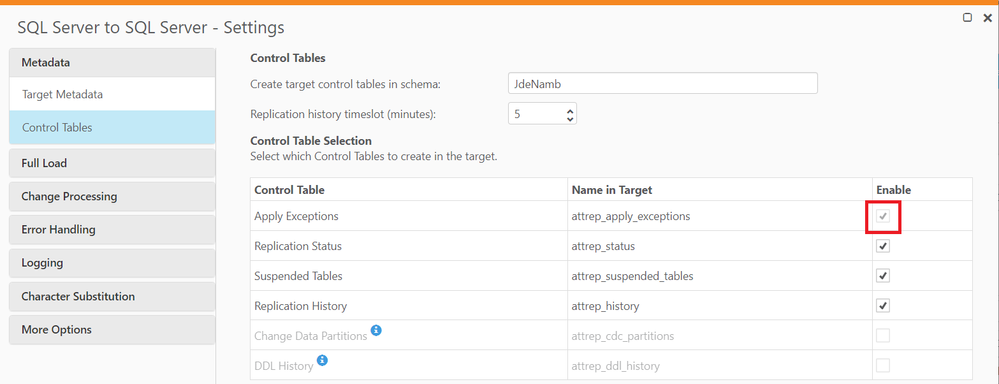
You may notice that you cannot turn off the Apply Exceptions in the Qlik Replicate control table settings. The option to do so is greyed out and cannot be unchecked.  See img 01.

img 1img 1


Change Processing errors are recorded in the attrep_apply_exceptions table. The data in this table is never deleted. For more information on the Apply Exceptions table please review attrep_apply_exceptions.

Additional tables and data take up space and resources in the database, so some people prefer to opt out of having this table for a Replicate task. This can be done with some additional configuration.


Disabling the Apply Exceptions table

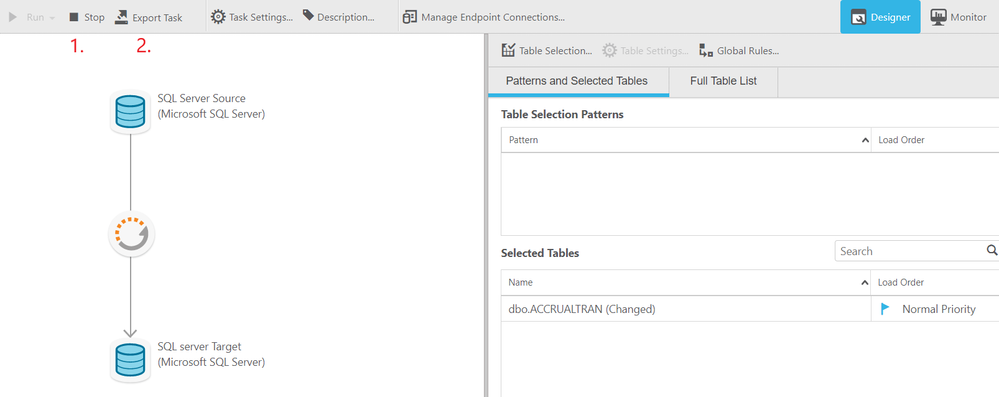
  1. Stop the Replicate task and then export a JSON of the task with the Export Task option under the Designer tab

    Export Task.png

  2. Open the JSON exported and add the following line of information to the common_settings object and save it.

    "exception_table_enabled": false,

    You may find that your task JSON contains the following line of information. In this case, the word true can be changed to false without needing to add the information a second time.

    "exception_table_enabled": true,

    Before change:
    "common_settings":	{
    						"support_lobs":	false,
    						"change_table_settings":	{
    							"handle_ddl":	false,
    							"header_columns_settings":	{
    							}
    						},
    						"full_load_enabled":	false,
    						"audit_table_settings":	{
    						},
    						"dr_settings":	{
    						},
    						"statistics_table_settings":	{
    						},
    						"bidi_table_settings":	{
    						},
    						"task_uuid":	"c24fe2e3-9d04-334c-80c4-35f4b349f9e4",
    						"status_table_settings":	{
    						},
    						"status_table_enabled":	true,
    						"suspended_tables_table_settings":	{
    						},
    						"suspended_tables_table_enabled":	true,
    						"history_table_settings":	{
    						},
    						"history_table_enabled":	true,
    						"exception_table_settings":	{
    						},
    						"recovery_table_settings":	{
    						},
    						"data_batching_settings":	{
    						},
    						"data_batching_table_settings":	{
    						},
    						"log_stream_settings_depricated":	{
    						},
    						"ddl_history_table_settings":	{
    						},
    						"customized_charset_settings":	{
    							"validation":	{
    								"sub_char":	0
    							}
    						}
    					}
    				},

    After change:
    "common_settings":	{
                            "exception_table_enabled": false,
    						"support_lobs":	false,
    						"change_table_settings":	{
    							"handle_ddl":	false,
    							"header_columns_settings":	{
    							}
    						},
    						"full_load_enabled":	false,
    						"audit_table_settings":	{
    						},
    						"dr_settings":	{
    						},
    						"statistics_table_settings":	{
    						},
    						"bidi_table_settings":	{
    						},
    						"task_uuid":	"c24fe2e3-9d04-334c-80c4-35f4b349f9e4",
    						"status_table_settings":	{
    						},
    						"status_table_enabled":	true,
    						"suspended_tables_table_settings":	{
    						},
    						"suspended_tables_table_enabled":	true,
    						"history_table_settings":	{
    						},
    						"history_table_enabled":	true,
    						"exception_table_settings":	{
    						},
    						"recovery_table_settings":	{
    						},
    						"data_batching_settings":	{
    						},
    						"data_batching_table_settings":	{
    						},
    						"log_stream_settings_depricated":	{
    						},
    						"ddl_history_table_settings":	{
    						},
    						"customized_charset_settings":	{
    							"validation":	{
    								"sub_char":	0
    							}
    						}
    					}
    				},

    Notes: Each object within the common_settings is separated by a comma. The last object does not end with a comma. In this scenario, the extra line of information to be added is added as the first object. The order of the objects does not matter so this line of information can be placed in any order as long as the objects are separated by commas in the correct syntax format. Spacing does need to be kept in its original format.

  3. Import the task JSON that was saved and resume the task. If the attrep_apply_exceptions table was already created previously, you may drop the table. The new settings in the task import will prevent the task from creating an attrep_apply_exceptions table. This is not reflected in the UI, but will continue to be reflected in the task JSON with the line of information stating  "exception_table_enabled": false, 

Environment


The information in this article is provided as-is and to be used at own discretion. Depending on tool(s) used, customization(s), and/or other factors ongoing support on the solution below may not be provided by Qlik Support.

Labels (1)
Version history
Last update:
‎2023-03-21 04:38 AM
Updated by: