Unlock a world of possibilities! Login now and discover the exclusive benefits awaiting you.

- Qlik Community
- :
- Blogs
- :
- Technical
- :
- Product Innovation
- :
- Creating a write back solution with Qlik Cloud is ...

 RoccoP_Qlik
- Subscribe to RSS Feed
- Mark as New
- Mark as Read
- Bookmark
- Subscribe
- Printer Friendly Page
- Report Inappropriate Content
Static, read-only dashboards are a thing of the past compared to what's possible now in Qlik Cloud.
‘Write back’ solutions offer the ability to input data or update dimensions in source systems, such as databases or CRMs, all while staying within a Qlik Sense app.
The solution incorporates both Qlik Cloud and Application Automation to enable users to input data from a dashboard or application and run the appropriate data refresh across the source system as well as the analytics.
Example Use Cases:
- Ticket/ Incident Creation
- Create Ticket or Incident in JIRA or ServiceNow.
- Data Changes
- Update Deals/Accounts in a CRM like HubSpot or Salesforce.
- Data Annotations
- Add a comment to or more records in a source system.
This new feature is possible with all of the connectors located in Application Automation, including:
- CRMs like HubSpot or Salesforce
- Databases like Snowflake, Databricks, Google Bigquery
- SharePoint
- and more!
Below you can see technical diagram based around using Application Automation for a write back solution.
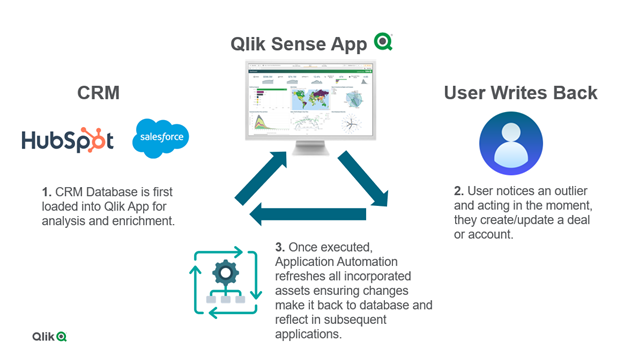
The ability to write back in Qlik Cloud is a game changer for customers who want to operationalize their existing Qlik Sense applications to enhance decision making right inside an app where the analytics live. This not only streamlines business processes across an ever-growing data landscape, but it also enables users to to act in the moment. With Application Automation powering the write back executions, customers can unlock more value across their data and analytics environment.
To learn more for a more ‘hands-on tutorial’ please see video here.
You must be a registered user to add a comment. If you've already registered, sign in. Otherwise, register and sign in.