Do not input private or sensitive data. View Qlik Privacy & Cookie Policy.
Skip to main content

Announcements
Independent validation for trusted, AI-ready data integration. See why IDC named Qlik a Leader: Read the Excerpt!
RoccoP_Qlik
Employee
Employee

The new Application Automation feature allows users to either update, change, or comment into source systems directly from a Qlik Sense app!

Static, read-only dashboards are a thing of the past compared to what's possible now in Qlik Cloud.

‘Write back’ solutions offer the ability to input data or update dimensions in source systems, such as databases or CRMs, all while staying within a Qlik Sense app.

The solution incorporates both Qlik Cloud and Application Automation to enable users to input data from a dashboard or application and run the appropriate data refresh across the source system as well as the analytics.

Example Use Cases:

  1. Ticket/ Incident Creation
    • Create Ticket or Incident in JIRA or ServiceNow.
  2. Data Changes
    • Update Deals/Accounts in a CRM like HubSpot or Salesforce.
  3. Data Annotations
    • Add a comment to or more records in a source system. 

This new feature is possible with all of the connectors located in Application Automation, including:

  • CRMs like HubSpot or Salesforce
  • Databases like Snowflake, Databricks, Google Bigquery
  • SharePoint
  • and more!

Below you can see technical diagram based around using Application Automation for a write back solution.
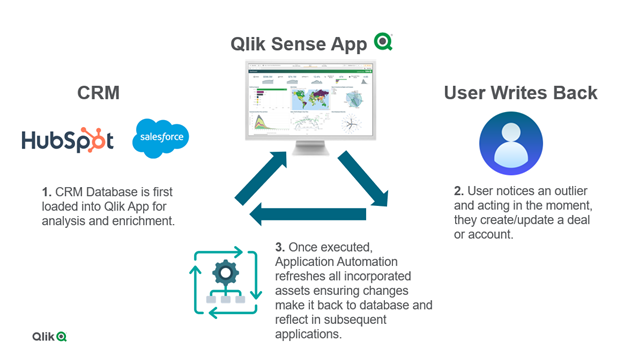
Diagram.png

The ability to write back in Qlik Cloud is a game changer for customers who want to operationalize their existing Qlik Sense applications to enhance decision making right inside an app where the analytics live. This not only streamlines business processes across an ever-growing data landscape, but it also enables users to to act in the moment. With Application Automation powering the write back executions, customers can unlock more value across their data and analytics environment.

To learn more for a more ‘hands-on tutorial’ please see video here.

28 Comments
robert99
Specialist III
Specialist III

@Kayleigh_Milewski 


Have you tried this. I about to give it a go. It doesn't include automations

Create a Writeback solution in Qlik Sense - Easy (youtube.com)

0 Likes
1,207 Views
MichaelJansen
Contributor
Contributor

Hi @RoccoP_Qlik 

Thank-you for sharing the writeback solution video. 

I noticed the Microsoft SQL Server connection is there but I require the Microsoft SQL Server (via Direct Access gateway) connection.

When will this connection become available via Automations.

Is this connection on the Automations or Qlik connectors roadmap?

Regards

Michael 

0 Likes
1,124 Views
christofferkristensen
Partner - Contributor II

Hi,

We are using an extension developed by Qloud Cover. It is build natively to create Writeback tables in Qlik sheets where you can interactively writeback from existing data in Qlik. One of the benefits of the product is you can choose between a SaaS product or self-hosted. You can configure where to store the data and they support datastores like Snowflake, Redshift BigQuery and AWS Redshift. You can read more about the product at the Qloud Cover website:

https://qloudcover.com/qloud-cover-writeback/

Or you can create a free trail on the product website https://writeback.qloudcover.com/ and get easily started.

991 Views
sanrout
Contributor III
Contributor III

Hi @RoccoP_Qlik @Emile_Koslowski,


We have implemented the above solution; it is working well for single record update for a given ID. Our underlying database is AWS redshift having a table with three fields "ID", "Alternative" and "Adopted". However our requirement is different. Business needs to select multiple values in a field ID and let them update respective values in Alternative and Adopted fields. How can loop over that in automation using blocks? 


sanrout_0-1738828292116.png


0 Likes
791 Views
salmankojar
Partner - Creator II

HI @sanrout what will be the values of the other fields which you are updating multiple Ids? will the other field values be same for all those selected IDs?

0 Likes
770 Views
sanrout
Contributor III
Contributor III

Hi @salmankojar,


Case 1: other field values same for all the selected IDs

Case 2: other field values different. 

Current requirement is for Case 1.


0 Likes
755 Views
sanrout
Contributor III
Contributor III

Hi,

one idea/possible solution for the above requirement can be by the use of loop block.

Picking all current selections into loop block, but unable to pick single value into "Get Expresession value" for each iteration as shown below.

sanrout_0-1738838141880.png


0 Likes
744 Views
sanrout
Contributor III
Contributor III

Hi,


We have successfully implemented bulk updates using loop blocks in automation


Regards,

Shankar

0 Likes
678 Views