Unlock a world of possibilities! Login now and discover the exclusive benefits awaiting you.


 QlikProductUpda
- Subscribe to RSS Feed
- Mark as New
- Mark as Read
- Bookmark
- Subscribe
- Printer Friendly Page
- Report Inappropriate Content
Can't see the video? View it on the Qlik site here
Want to see more?
- YouTube - PowerPoint Output Format - Subscription and Report Service Walkthrough
- Qlik Site - PowerPoint Output Format - Subscription and Report Service Walkthrough
For Qlik business users, PowerPoint output format is now available when scheduling sheet or chart report delivery. For report developers, PowerPoint format is also available from the Qlik Reporting Service when used via direct API call or with Qlik Application Automation and the reporting connectors.
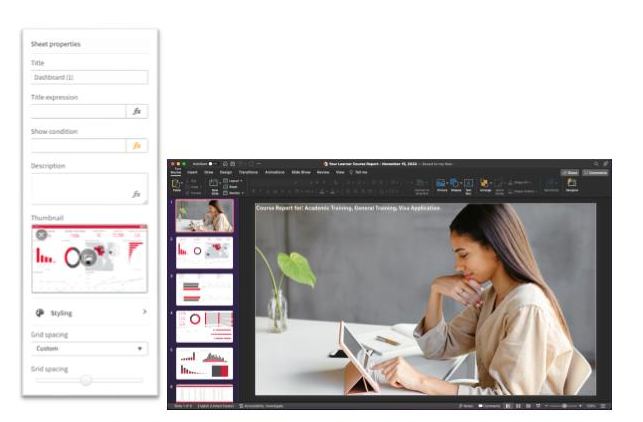
When delivering sheets to PowerPoint, the visualizations within a Qlik Sense sheet are optimally presented in the PowerPoint slide as individual images with opaque backgrounds, allowing the recipient to resize individual images, annotate with native objects and apply PPT theming to the slide before business presentation. An associated Qlik Sense Client change will also allow for background images in a Qlik Sense sheet and a finer grain grid if application/report developers wish to pre-design an app for PowerPoint format report usage.
Qlik continues extend functionality and future-proof investment for Qlik cloud reporting with our release today. As we head into 2023, we continue to partner with our customers on addressing their critical reporting requirements and delivering against our cloud reporting roadmap. Join us on January 24th for our Talk to Experts Tuesday Qlik Community webinar, “Q&A with Qlik: Making the Move to Qlik Cloud Reporting”.
You must be a registered user to add a comment. If you've already registered, sign in. Otherwise, register and sign in.