Unlock a world of possibilities! Login now and discover the exclusive benefits awaiting you.

- Qlik Community
- :
- Forums
- :
- Data Integration
- :
- Products & Topics
- :
- Qlik Compose
- :
- Re: Compose Cli generating error
- Subscribe to RSS Feed
- Mark Topic as New
- Mark Topic as Read
- Float this Topic for Current User
- Bookmark
- Subscribe
- Mute
- Printer Friendly Page

 ldunovant
- Mark as New
- Bookmark
- Subscribe
- Mute
- Subscribe to RSS Feed
- Permalink
- Report Inappropriate Content
Compose Cli generating error
I'm pretty new to Qlik. I'm using May 2022 (2022.5.0.403) version of Compose. Per documentation I should be able to use ComposeCli.exe to export objects to csv files. From Administrato Command Window, the command I'm using is
composecli.exe export_csv --project ProjectName --outfolder c:\FolderName
This fails with error SYS-E-SESS_LOST, The client is not connected to the Server. Please connect and then try again.

Please assist. What am I doing wrong?
LD
Accepted Solutions

.png "Former Employee") Dana_Baldwin
Dana_Baldwin
- Mark as New
- Bookmark
- Subscribe
- Mute
- Subscribe to RSS Feed
- Permalink
- Report Inappropriate Content
Hi @ldunovant
At the composecli prompt, try entering "connect" (without the quotes) and pressing enter - then try your export command. Please let us know the results.
Thanks,
Dana
Dana_Baldwin
- Mark as New
- Bookmark
- Subscribe
- Mute
- Subscribe to RSS Feed
- Permalink
- Report Inappropriate Content
Hi @ldunovant
At the composecli prompt, try entering "connect" (without the quotes) and pressing enter - then try your export command. Please let us know the results.
Thanks,
Dana
ldunovant
- Mark as New
- Bookmark
- Subscribe
- Mute
- Subscribe to RSS Feed
- Permalink
- Report Inappropriate Content
@Dana_Baldwin that worked. thank you so much. Is there a document somewhere that I can refer to for everything Compose Cli?
Dana_Baldwin
- Mark as New
- Bookmark
- Subscribe
- Mute
- Subscribe to RSS Feed
- Permalink
- Report Inappropriate Content
You're welcome @ldunovant
There isn't a specific or separate document on using ComposeCli, but it is mentioned in a few places in the User Guide if you search for it:
Hope this helps
Dana

 Nanda_Ravindra
- Mark as New
- Bookmark
- Subscribe
- Mute
- Subscribe to RSS Feed
- Permalink
- Report Inappropriate Content
@ldunovantAs Dana mentioned there isn't a specific document for all the available options from Composecli command. But typing "composecli --help" from the installation bin folder will list all the available options.
Below is the part of the output from "composecli --help" command.
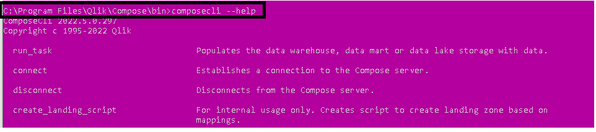
For further help with the individual command you can specify --help with a specific operation. Like this:
composecli generate_upgrade_scripts --help

Hope this helps!
Thanks,
Nanda
