Unlock a world of possibilities! Login now and discover the exclusive benefits awaiting you.

- Qlik Community
- :
- Forums
- :
- Data Integration
- :
- Products & Topics
- :
- Qlik Compose
- :
- Databricks projects
- Subscribe to RSS Feed
- Mark Topic as New
- Mark Topic as Read
- Float this Topic for Current User
- Bookmark
- Subscribe
- Mute
- Printer Friendly Page

 t_schueller
- Mark as New
- Bookmark
- Subscribe
- Mute
- Subscribe to RSS Feed
- Permalink
- Report Inappropriate Content
Databricks projects
Hello,
I created two C4DL Projects by choosing Databricks as type.
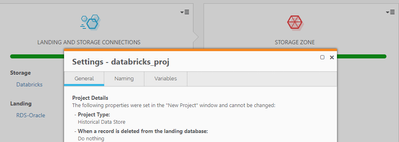
First project: I was surprised when I took a look at my DB and saw the data format, so I checked the project type and it's setted to Historical Data Store. You can see it the following screenshot and the deployment package extract:
"exclude_to_date": true,
"acid_transactions": true,
"big_data_project_type": "HISTORICAL_DATASTORE_WITHOUT_ACID",
"dwh_type": "DATABRICKSDELTA",
"rno_ins": "RUNNO_INSERT",
"rno_upd": "RUNNO_UPDATE",
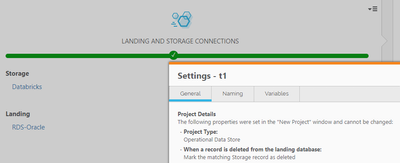
The second project: The project type is setted to Operational Data Store.
"exclude_to_date": true,
"acid_transactions": true,
"big_data_project_type": "OPERATIONAL_DATASTORE",
"dwh_type": "DATABRICKSDELTA",
"rno_ins": "RUNNO_INSERT",
"rno_upd": "RUNNO_UPDATE",
The documentation says:
Databricks is currently supported on Azure. Delta is required by Compose in order to
create a replica of the source data (Operational Data Store - ODS).
I created both project the same way and I can't select an other options than ODS.
Can you explain me what happend?
Thanks for your help.

 Brian_Jones
- Mark as New
- Bookmark
- Subscribe
- Mute
- Subscribe to RSS Feed
- Permalink
- Report Inappropriate Content
I can't fully explain how one of your Compose for Data Lakes projects had a project type of HISTORICAL_DATASTORE_WITHOUT_ACID in the json file , but I can confirm the only type of Compose for Data Lakes Databricks project you should be able to create is an ODS. Perhaps you can create a ticket and upload the two project json files so our support team can investigate further?
t_schueller
- Mark as New
- Bookmark
- Subscribe
- Mute
- Subscribe to RSS Feed
- Permalink
- Report Inappropriate Content
Hi Brian,
Thanks, I will open a case in the support
