Unlock a world of possibilities! Login now and discover the exclusive benefits awaiting you.

- Qlik Community
- :
- All Forums
- :
- QlikView Administration
- :
- Scroll bar not behaving as expected
- Subscribe to RSS Feed
- Mark Topic as New
- Mark Topic as Read
- Float this Topic for Current User
- Bookmark
- Subscribe
- Mute
- Printer Friendly Page

- Mark as New
- Bookmark
- Subscribe
- Mute
- Subscribe to RSS Feed
- Permalink
- Report Inappropriate Content
Scroll bar not behaving as expected
Hi everyone,
I have a line chart that presents monthly data from 2001 to 2014 and it's set to show only 12 values, so I have a scroll bar that allows the user to move back. I need the position of the scroll bar to be always 2014 so I 've set the "Reversed" option on presentation tab. However, whenever I remove a filter (any filter) the scroll bar gets back to a random year when it should be always on the right side of the chart, pointing to 2014.
Does anyone knows why the scroll bar is behaving like this?
Any ideas are welcome!
Thank you all.
- Tags:
- qlikview_deployment
Accepted Solutions

 Colin-Albert
- Mark as New
- Bookmark
- Subscribe
- Mute
- Subscribe to RSS Feed
- Permalink
- Report Inappropriate Content

 cspencer3
- Mark as New
- Bookmark
- Subscribe
- Mute
- Subscribe to RSS Feed
- Permalink
- Report Inappropriate Content
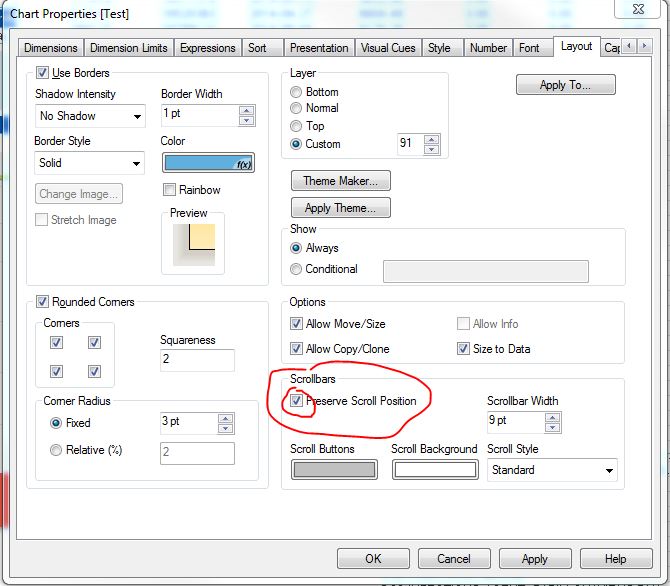
Have you tried checking the box for 'Preserve Scroll Position' on the layout tab of the properties menu?
- Mark as New
- Bookmark
- Subscribe
- Mute
- Subscribe to RSS Feed
- Permalink
- Report Inappropriate Content
Yes, it didn't work. The scroll bar keeps moving back to random years when I clean a filter.
cspencer3
- Mark as New
- Bookmark
- Subscribe
- Mute
- Subscribe to RSS Feed
- Permalink
- Report Inappropriate Content
It may be a bug of some form. Does it do this on a local development version and on the QV Server?
- Mark as New
- Bookmark
- Subscribe
- Mute
- Subscribe to RSS Feed
- Permalink
- Report Inappropriate Content
Yes, it happens on both situations.
cspencer3
- Mark as New
- Bookmark
- Subscribe
- Mute
- Subscribe to RSS Feed
- Permalink
- Report Inappropriate Content
Just thinking that if you had a different developer version vs. server version that it may be a bug in one but not the other. Wish I could help you.
- Mark as New
- Bookmark
- Subscribe
- Mute
- Subscribe to RSS Feed
- Permalink
- Report Inappropriate Content
Thank you for replying! 
Colin-Albert
- Mark as New
- Bookmark
- Subscribe
- Mute
- Subscribe to RSS Feed
- Permalink
- Report Inappropriate Content
This is listed as a fixed bug in v11.2 SR8

- Mark as New
- Bookmark
- Subscribe
- Mute
- Subscribe to RSS Feed
- Permalink
- Report Inappropriate Content
Thank you, Colin!