Unlock a world of possibilities! Login now and discover the exclusive benefits awaiting you.

- Qlik Community
- :
- All Forums
- :
- QlikView
- :
- Actual vs Budget
- Subscribe to RSS Feed
- Mark Topic as New
- Mark Topic as Read
- Float this Topic for Current User
- Bookmark
- Subscribe
- Mute
- Printer Friendly Page

- Mark as New
- Bookmark
- Subscribe
- Mute
- Subscribe to RSS Feed
- Permalink
- Report Inappropriate Content
Actual vs Budget
Initially I have two fact tables : Actual and budget
I consolidate them into one table TempVente as it's shown in the figure
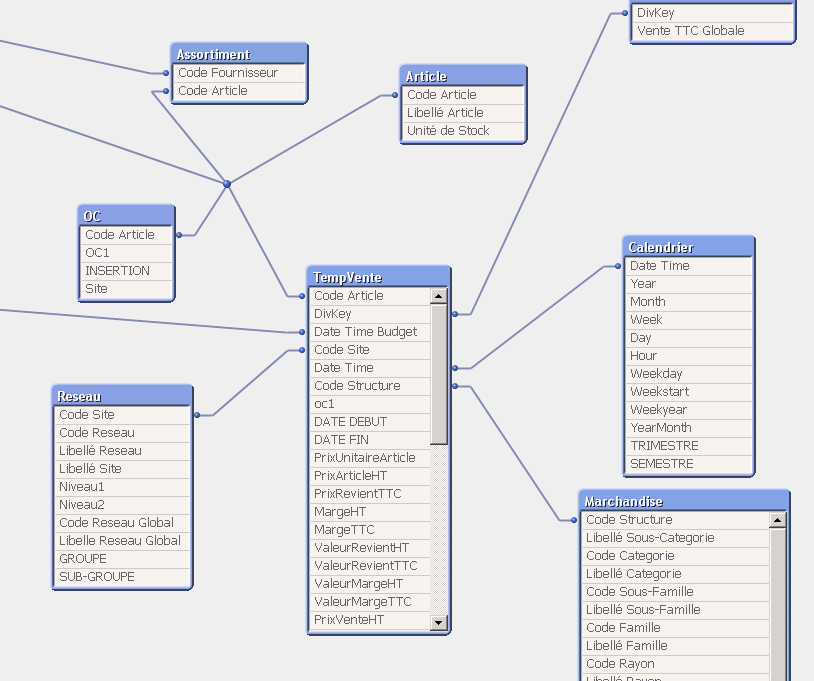
I have for some Code site budget (for example Code site =10 ) but I didn't have actual , how can I make in this case code site in grey color in filter
The same case for datetime Sometimes I have budget but not actual , specilaaly for dates in the future
In other words , how can I all my filters attached to the measure actual and not to budget ?
Any help would be the most appreciated
- Tags:
- new_to_qlikview

 marcus_sommer
- Mark as New
- Bookmark
- Subscribe
- Mute
- Subscribe to RSS Feed
- Permalink
- Report Inappropriate Content
I think you will need to create these missing data: How to populate a sparsely populated field.
- Marcus
- Mark as New
- Bookmark
- Subscribe
- Mute
- Subscribe to RSS Feed
- Permalink
- Report Inappropriate Content
I didn't figure out the idea .

 sathishkumar_go
- Mark as New
- Bookmark
- Subscribe
- Mute
- Subscribe to RSS Feed
- Permalink
- Report Inappropriate Content
Hi Jaweher,
While doing the Actual and Budget data concatenate with one table you have to be very careful.
Take the data which don't have actual, those data's make it "0" as actual and concatenate with the "TempVente" table.
-Sathish
marcus_sommer
- Mark as New
- Bookmark
- Subscribe
- Mute
- Subscribe to RSS Feed
- Permalink
- Report Inappropriate Content
It's a complex and difficult topic and you won't get a quick solution then probably you will need bigger adjustments to your data-model. In some cases it's enough to use the implicit power of the qv color-patterns (grey), see: Finding NULL but is this isn't enough you need to create your missing data then only real data could be showed within qv.
See further here Re: Budget Achievement. to get more ideas how to could work on it.
- Marcus
- Mark as New
- Bookmark
- Subscribe
- Mute
- Subscribe to RSS Feed
- Permalink
- Report Inappropriate Content
I still do not figure out , I am a newbie with qlikview
marcus_sommer
- Mark as New
- Bookmark
- Subscribe
- Mute
- Subscribe to RSS Feed
- Permalink
- Report Inappropriate Content
I'm sorry but at the moment I could only recommend to read all the provided postings and their included links carefully then it's more complicated as it could be solved here with a few answers. It could be that you need external help from a qlikview partner for this task.
- Marcus