Unlock a world of possibilities! Login now and discover the exclusive benefits awaiting you.

- Qlik Community
- :
- All Forums
- :
- QlikView App Dev
- :
- Add set modifiers in dynamic function
- Subscribe to RSS Feed
- Mark Topic as New
- Mark Topic as Read
- Float this Topic for Current User
- Bookmark
- Subscribe
- Mute
- Printer Friendly Page

 felcar2013
- Mark as New
- Bookmark
- Subscribe
- Mute
- Subscribe to RSS Feed
- Permalink
- Report Inappropriate Content
Add set modifiers in dynamic function
Hi
i have a variable that depends on number of tables of the data model and number of fields per every table. The variable was generated in the script and has this form:
Z = count({$<f11=, f12=, f13=,....,f1(n-1)=, f1n=>} TOTAL <f21, f22, f23, ...., f2(m-1), f2m> FIELD_CUSTOMER)
if i include new tables and fields the variable grows dinamically.
I want to set restrictions to Z, like <age_id= {12},region_id={1}, .... etc>, that is the total number of customers found. I wanted to break down the variable Z in different components or variables, so that I can add the set modifiers as I want and in an undetermined number, but o not know where.
How can I break down the Z variable, taking into account that the expressions in the variable is dynamic, since the length of the variable grows when including new tables.
Would it be possible to create a dynamic variable which is a function of a kind of get field function, so that i can include all set modifiers i want , like "<age_id ={12}, region_id = {1}>", in front of the "f11" list field? like this
define variable V = V(getfields())
and include it in Z as :
Z = count({$<$(V), f11=, f12=, f13=,....,f1(n-1)=, f1n=>} TOTAL <f21, f22, f23, ...., f2(m-1), f2m> FIELD_CUSTOMER)
if i copy and paste the variable and set the restrictions as an static formula, it will not work if i add new tables.
any suggestion would be very welcome
felipe
 fosuzuki
- Mark as New
- Bookmark
- Subscribe
- Mute
- Subscribe to RSS Feed
- Permalink
- Report Inappropriate Content
You're almost there. My suggestion:
In your script, you could create two variables: vSetFields and vTotalFields. Make the script set the values like:
let vSetFields = 'f11=, f12=, f13=,....,f1(n-1)=, f1n=';
let vTotalFields = 'f21, f22, f23, ...., f2(m-1), f2m';
And then, in the layout, create another variable with your other set modifiers:
vOtherSetFields = ', age_id ={12}, region_id = {1}' (note the comma at the beginning...)
And your final variable can be like:
V = count({$<$(vSetFields) $(vOtherSetFields)>} TOTAL <$(vTotalFields)> FIELD_CUSTOMER)
Hope this helps
Fernando
felcar2013
- Mark as New
- Bookmark
- Subscribe
- Mute
- Subscribe to RSS Feed
- Permalink
- Report Inappropriate Content
hi Fernando
with let did not work, but with set.
SET vSet = 'transaction_FashionGrade=, transaction_Markdowns_EUR=, transaction_NetSalesinclVAT_EUR=, transaction_Origin=, transaction_Rebates_EUR=, transaction_SalePrice_EUR=, transaction_SalesOrderDetailID=, transaction_SalesOrderID=, transaction_Season=, transaction_SENCode=, transaction_MSNCode=, transaction_TotalPriceReductions_EUR=, transaction_Type=, transaction_type=, transaction_Counter=, transaction_date_yearweek=';
SET vTotal = 'contact_ActivityEcom, contact_ActivityMultichannel, contact_ActivityRetail, contact_AdvertisingChannel, contact_Age, contact_CommunicationEmail_possible, contact_CommunicationLanguage, contact_CommunicationWhitemail_possible, contact_CustomerExperience, contact_AdvertisingRegistrationStoreName, contact_AdvertisingRegistrationStoreCommunicationName, contact_AdvertisingRegistrationStoreSalesChannel, contact_AdvertisingRegistrationStoreCountry';
SET vSetAttributes = '%gender__contact__ID ={'1'}, ';
SET z_bestand_vSet = sum({$<$(vSet)>} total <$(vTotal)> %x_counter_membercontact_ID); // this worked
SET z_bestand_vSet_1 = sum({$<$(vSetAttributes)$(vSet)> total <$(vTotal)> %x_counter_membercontact_ID); // this did not
you proposed to use let, but it did not work
do you know what may be wrong?
thanks
felipe
fosuzuki
- Mark as New
- Bookmark
- Subscribe
- Mute
- Subscribe to RSS Feed
- Permalink
- Report Inappropriate Content
There is a difference when using SET and LET. The LET statement, in opposition to the SET statement, evaluates the expression on the right side of the '=' before it is assigned to the variable.
So, in order to use LETs, it should look like:
let vSet = 'transaction_FashionGrade=, transaction_Markdowns_EUR=, transaction_NetSalesinclVAT_EUR=, transaction_Origin=, transaction_Rebates_EUR=, transaction_SalePrice_EUR=, transaction_SalesOrderDetailID=, transaction_SalesOrderID=, transaction_Season=, transaction_SENCode=, transaction_MSNCode=, transaction_TotalPriceReductions_EUR=, transaction_Type=, transaction_type=, transaction_Counter=, transaction_date_yearweek=';
let vTotal = 'contact_ActivityEcom, contact_ActivityMultichannel, contact_ActivityRetail, contact_AdvertisingChannel, contact_Age, contact_CommunicationEmail_possible, contact_CommunicationLanguage, contact_CommunicationWhitemail_possible, contact_CustomerExperience, contact_AdvertisingRegistrationStoreName, contact_AdvertisingRegistrationStoreCommunicationName, contact_AdvertisingRegistrationStoreSalesChannel, contact_AdvertisingRegistrationStoreCountry';
let vSetAttributes = '%gender__contact__ID ={"1"},';
let z_bestand_vSet = 'sum({$<$(vSet)>} total <$(vTotal)> %x_counter_membercontact_ID)';
let z_bestand_vSet_1 = 'sum({$<$(vSetAttributes) $(vSet)> total <$(vTotal)> %x_counter_membercontact_ID)';
But you can also work with SETs. In this case, modify this line:
SET vSetAttributes = '%gender__contact__ID ={'1'}, ';
with:
SET vSetAttributes = %gender__contact__ID ={'1'},;
felcar2013
- Mark as New
- Bookmark
- Subscribe
- Mute
- Subscribe to RSS Feed
- Permalink
- Report Inappropriate Content
hi
i did with let and worked well for the formula summary (z_bestand_vSet), but again not when i include the
vSetAttributes, which include my extra set fields. i change the position of the new defined variables, and changed the comma.
do you see something rare in the formula? i have tried different options, but i do not get a result for the formula, though it runs
thanks
felipe
LET vSet = 'transaction_FashionGrade=, transaction_ProductGenericArticle=, transaction_ProductFormKey=, transaction_ProductForm=, transaction_date=, transaction_date_week=, transaction_date_year=, transaction_date_month=, transaction_date_weekday=, transaction_date_monthyear=, transaction_date_yearweek=';
LET vTotal = 'contact_ActivityEcom, contact_ActivityMultichannel, contact_ActivityRetail, contact_AdvertisingChannel, contact_Age, contact_CommunicationEmail_possible, contact_AdvertisingRegistrationStoreSalesChannel, contact_AdvertisingRegistrationStoreCountry';
LET vSetAttributes = ', %activity__ID ={1}';
LET z_bestand_vSet = 'sum({$<$(vSet)>} total <$(vTotal)> %x_counter_membercontact_ID)';
LET z_bestand_vSet_1 = 'sum({$<$(vSet)$(vSetAttributes)> total <$(vTotal)> %x_counter_membercontact_ID)';
fosuzuki
- Mark as New
- Bookmark
- Subscribe
- Mute
- Subscribe to RSS Feed
- Permalink
- Report Inappropriate Content
There's a missing '}' to close the set analysis part:
LET z_bestand_vSet_1 = 'sum({$<$(vSet)$(vSetAttributes)>} total <$(vTotal)> %x_counter_membercontact_ID)';
felcar2013
- Mark as New
- Bookmark
- Subscribe
- Mute
- Subscribe to RSS Feed
- Permalink
- Report Inappropriate Content
great, thanks!
felcar2013
- Mark as New
- Bookmark
- Subscribe
- Mute
- Subscribe to RSS Feed
- Permalink
- Report Inappropriate Content
hi
when i use for the same situation, instead of $(vSetAttributes), a concrete field, like %gender__contact__ID, i realized, the system does not recognize the "TOTAL" qualifier.
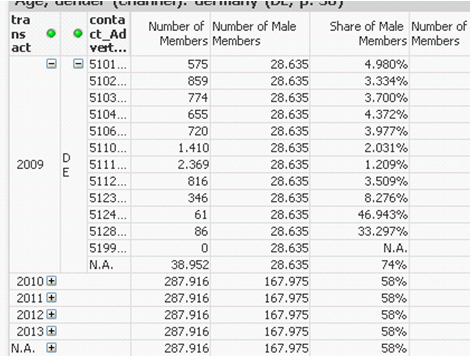
I cannot discover what is wrong with the formula below (i also changed the position of the comma). QV reads my set variable, but not the total ones, so that when i breakdown the year 2009 (see picture), the number of members works well, but not the male members. The 28.635 shall be broken down into numbers lower than the number of members column. This is, for 5101, it should be less than 585 and so on, and the total shall be 28.635. any idea, would be very helpful
thanks
sum
({$<%gender__contact__ID={1}, $(vSet)>} Total < $(vTotal)> %x_counter_membercontact_ID)