Unlock a world of possibilities! Login now and discover the exclusive benefits awaiting you.

- Qlik Community
- :
- All Forums
- :
- QlikView App Dev
- :
- Background Color
- Subscribe to RSS Feed
- Mark Topic as New
- Mark Topic as Read
- Float this Topic for Current User
- Bookmark
- Subscribe
- Mute
- Printer Friendly Page

 paulwalker
- Mark as New
- Bookmark
- Subscribe
- Mute
- Subscribe to RSS Feed
- Permalink
- Report Inappropriate Content
Background Color
Hi All,
I have developed one chart ..
How to give bubble color..
Suppose I have 2 expressions..
Dimension: Customer
1. Sum(sales)/Sum(Total Amout)
2. Sum(revenue)
Suppose if
Donna Mitchell 0-50 % = red
51-60% Green
61-100% Yellow
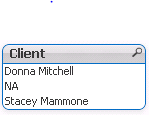
How to assign colors??
Thanks...
- « Previous Replies
-
- 1
- 2
- Next Replies »
 t_chetirbok
- Mark as New
- Bookmark
- Subscribe
- Mute
- Subscribe to RSS Feed
- Permalink
- Report Inappropriate Content
Hi!
Are your fields Customer and Client have relation 1 to 1?
for example if data is:
Customer Client sales
A A 100
A B 200
for Client A color is red(), for Client B color is green()
if you don't use Client as dimension, what color do you need?
paulwalker
- Mark as New
- Bookmark
- Subscribe
- Mute
- Subscribe to RSS Feed
- Permalink
- Report Inappropriate Content
Sorry for the delay..
Yes, I have mapping.. customer to client
for example
Customer Client sales
A A 100
A B 200
B A 1200
B B 250
Suppose if Client=A (0-50 Red, 51-60 Green, 61-100 Yellow)
If Client=B (0-45 Red, 46-70 Green, 71-100 Yellow)
and If client='Remaining' (what if i have C,D=== 0-30 Red, 31-60 Yellow, 61-100 Green)
Hope you understand.....
Thanks ....
paulwalker
- Mark as New
- Bookmark
- Subscribe
- Mute
- Subscribe to RSS Feed
- Permalink
- Report Inappropriate Content
is this possible????

 rudolfhbantim
- Mark as New
- Bookmark
- Subscribe
- Mute
- Subscribe to RSS Feed
- Permalink
- Report Inappropriate Content
if you have tree filds, like red, green and yellow mapping with your client A, for exemple:
yellow = ‘>=61<=100
if(aggr(Sum(sales)/Sum(Total Amout),Client) = $(=Red), red(),
if(aggr(Sum(sales)/Sum(Total Amout),Client) = $(=green), green(),
if(aggr(Sum(sales)/Sum(Total Amout),Client) = $(=yellow),yellow() )))
i think it can work.
paulwalker
- Mark as New
- Bookmark
- Subscribe
- Mute
- Subscribe to RSS Feed
- Permalink
- Report Inappropriate Content
I don't have any tree field..
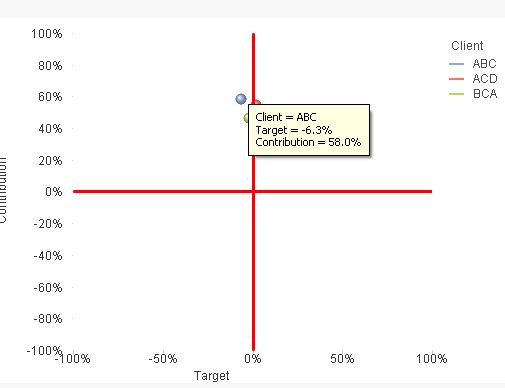
I am using Scatter chart..
Depends on Expression, i am getting percentage...
Here my client=ABC=58%
Client=ABC= 0-50% RED
51-60% Green and
61-100% Yellow
Client=ACD different color code
like (0-30 Red, 31-60 Green, 61-80 Yellow, 81-100 pink)
for Client=ABC=58%, My bubble it should be Green color, only contribution wise.....
I have to write Client=ABC one color code
Client=ACD one color code..
How to write for different color codes????
PFA,
paulwalker
- Mark as New
- Bookmark
- Subscribe
- Mute
- Subscribe to RSS Feed
- Permalink
- Report Inappropriate Content
Any possibility like this percentage wise color coding ??
Thanks...

 settu_periasamy
- Mark as New
- Bookmark
- Subscribe
- Mute
- Subscribe to RSS Feed
- Permalink
- Report Inappropriate Content
You can try like below (in the target expression -> Background Color) - like wise you change the color based on your client
Check the Attachment

paulwalker
- Mark as New
- Bookmark
- Subscribe
- Mute
- Subscribe to RSS Feed
- Permalink
- Report Inappropriate Content
Hi Settu,
Almost there.. I have many attributes..
Example:
| Client |
| ABC |
| ACD |
| ACC |
| ABB |
| ADD |
| KLM |
| OMN |
Here my client=ABC=58%
Client=ABC= 0-50% RED
51-60% Green and
61-100% Yellow
Client=ACD different color code
like (0-30 Red, 31-60 Green, 61-80 Yellow, 81-100 pink)
Remaining are (ACC,ABB,ADD,KLM,OMN) 0-40 Red, 41-60 Blue, 61-80 Yellow, 81-100 Green
Thanks...
settu_periasamy
- Mark as New
- Bookmark
- Subscribe
- Mute
- Subscribe to RSS Feed
- Permalink
- Report Inappropriate Content
Try this..
=if(Client='ABC',
if(sum(Contribution)>0.6 and sum(Contribution)<=1,
Yellow(),
if(sum(Contribution)>0.5 and sum(Contribution)<=0.6,
Green(),
if(sum(Contribution)>=0,
Red()))),
if(Client='ACD',
if(sum(Contribution)>0.8 and sum(Contribution)<=1,
Color(2), //write the pink color code using RGB()
if(sum(Contribution)>0.6 and sum(Contribution)<=0.8,
Yellow(),
if(sum(Contribution)>0.3 and sum(Contribution)<=0.6,
Green()))),
if(sum(Contribution)>0.8 and sum(Contribution)<=1,
Green(),
if(sum(Contribution)>0.6 and sum(Contribution)<=0.8,
Yellow(),
if(sum(Contribution)>0.4 and sum(Contribution)<=0.6,
Blue(),
if(sum(Contribution)>0 and sum(Contribution)<=0.4,
Red()))))))
paulwalker
- Mark as New
- Bookmark
- Subscribe
- Mute
- Subscribe to RSS Feed
- Permalink
- Report Inappropriate Content
Thanks Settu..... 

- « Previous Replies
-
- 1
- 2
- Next Replies »