Unlock a world of possibilities! Login now and discover the exclusive benefits awaiting you.

- Qlik Community
- :
- All Forums
- :
- QlikView App Dev
- :
- Barbeque chart
- Subscribe to RSS Feed
- Mark Topic as New
- Mark Topic as Read
- Float this Topic for Current User
- Bookmark
- Subscribe
- Mute
- Printer Friendly Page

- Mark as New
- Bookmark
- Subscribe
- Mute
- Subscribe to RSS Feed
- Permalink
- Report Inappropriate Content
Barbeque chart
Hi All,
I just used few trciks and came up with the barbeque chart.....I have created 2 versions (one with image and the other with just a line).
Wanted to share this with you and see if this can be visually improved. Like, can i have data labels only for the sections that are visible.
Note: i have entered some dummy data and gave it black color so that they become invisible.
Hope you liked this idea and can further add your experience in enhancing it further
Regards,
Yousuf
- Tags:
- new_to_qlikview
Accepted Solutions

 Roop
Roop
- Mark as New
- Bookmark
- Subscribe
- Mute
- Subscribe to RSS Feed
- Permalink
- Report Inappropriate Content
Yes, you need to change the left positioning. Quite easy if you know the code. 4th bar attached here.
- Mark as New
- Bookmark
- Subscribe
- Mute
- Subscribe to RSS Feed
- Permalink
- Report Inappropriate Content
Thanks for sharing...
- Mark as New
- Bookmark
- Subscribe
- Mute
- Subscribe to RSS Feed
- Permalink
- Report Inappropriate Content
Anybody with any suggestion as this can be improved further?
Roop
- Mark as New
- Bookmark
- Subscribe
- Mute
- Subscribe to RSS Feed
- Permalink
- Report Inappropriate Content
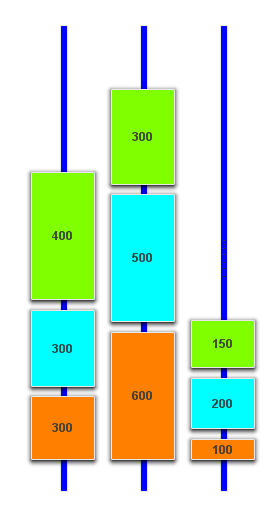
I figured that it was worth you spending additional time on something like this. The above shows a possible solution that relies on macro to build your chart. Try moving the objects around on the screen and they will rebuild accordingly.
The attached application is the completed work.
I am afraid that I only did this for TV, Laptop and DVD but the same will apply for everything else
I hope that it helps and I have shown how it can be done with some simplistic objects.
- Mark as New
- Bookmark
- Subscribe
- Mute
- Subscribe to RSS Feed
- Permalink
- Report Inappropriate Content
This looks awesome. Thanks for investing your time on this. Absolutely brilliant.
I just tried to replicate this by adding a 4th section (COM). I edited the code. The only challange is that the 3 boxes and the skew of the 4th section sticks to the 3rd skew. I believe i am missing a very minor step in the code. Can you please check this and highlight the missing part..
Thanks a ton
Roop
- Mark as New
- Bookmark
- Subscribe
- Mute
- Subscribe to RSS Feed
- Permalink
- Report Inappropriate Content
Yes, you need to change the left positioning. Quite easy if you know the code. 4th bar attached here.
- Mark as New
- Bookmark
- Subscribe
- Mute
- Subscribe to RSS Feed
- Permalink
- Report Inappropriate Content
Got It....missed that step...u multiplied it by 3.....Thanks a ton...this looks awesome....