Unlock a world of possibilities! Login now and discover the exclusive benefits awaiting you.

- Qlik Community
- :
- All Forums
- :
- QlikView App Dev
- :
- Blank Column in Pivot Table
- Subscribe to RSS Feed
- Mark Topic as New
- Mark Topic as Read
- Float this Topic for Current User
- Bookmark
- Subscribe
- Mute
- Printer Friendly Page

- Mark as New
- Bookmark
- Subscribe
- Mute
- Subscribe to RSS Feed
- Permalink
- Report Inappropriate Content
Blank Column in Pivot Table
Hi all,
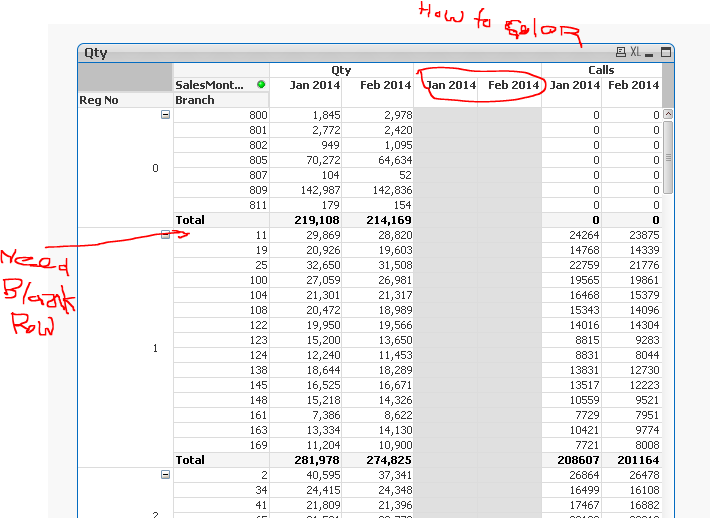
I have manage to do Blank Column in Pivot Table using Expression ' ' (Space) and
Background & Text Color = RGB(224,224,224) that's fine.
But now I want heading for this Blank Column invisible or greyed out with same colour like RGB(224,224,224).
How to do?
I also want Blank rows after each Total.
Please help!
- « Previous Replies
-
- 1
- 2
- Next Replies »

 wonkymeister
- Mark as New
- Bookmark
- Subscribe
- Mute
- Subscribe to RSS Feed
- Permalink
- Report Inappropriate Content
Upendra, how did you achieve this in a pivot chart?

 Venkatchoudary
- Mark as New
- Bookmark
- Subscribe
- Mute
- Subscribe to RSS Feed
- Permalink
- Report Inappropriate Content
It's Just a Suggestion
If you really need color for only 2 column headers, better solution to have a text box on top of it.

 rubenmarin
- Mark as New
- Bookmark
- Subscribe
- Mute
- Subscribe to RSS Feed
- Permalink
- Report Inappropriate Content
Hi Vinay, I don't think you can easily add a single column having year-month as a vertical dimension below expressions, it will show again the same values it shows for Qty and Calls.
Closer I get was using a calculated dimension to simulate the expressions but still has it's issues (null values, Dimension can be collapsed...).
I used Prashant's sample to test.
- « Previous Replies
-
- 1
- 2
- Next Replies »