Unlock a world of possibilities! Login now and discover the exclusive benefits awaiting you.

- Qlik Community
- :
- All Forums
- :
- QlikView App Dev
- :
- Change of Background Color of Calculated Dimension
- Subscribe to RSS Feed
- Mark Topic as New
- Mark Topic as Read
- Float this Topic for Current User
- Bookmark
- Subscribe
- Mute
- Printer Friendly Page

 agni_gold
- Mark as New
- Bookmark
- Subscribe
- Mute
- Subscribe to RSS Feed
- Permalink
- Report Inappropriate Content
Change of Background Color of Calculated Dimension
I have a Calculated Dimension
round(aggr((sum([HFM Value])-sum([ERP Amount USD]))/sum([HFM Value]),[%HFM Base Account]),0.01)
and i have written in backgroud of the dimesion
=if(round(aggr((sum([HFM Value])-sum([ERP Amount USD]))/sum([HFM Value]),[%HFM Base Account]),0.01)>0.20,RGB(255,0,0))
But it is comming like in below pic. Some values are changing color but some are not.
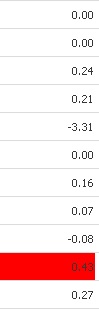
Please help

- Mark as New
- Bookmark
- Subscribe
- Mute
- Subscribe to RSS Feed
- Permalink
- Report Inappropriate Content
Can you upload an example?
agni_gold
- Mark as New
- Bookmark
- Subscribe
- Mute
- Subscribe to RSS Feed
- Permalink
- Report Inappropriate Content
PFa the app
- Mark as New
- Bookmark
- Subscribe
- Mute
- Subscribe to RSS Feed
- Permalink
- Report Inappropriate Content
See if the attached works for you. I added partial sums on last dimensions, with subtotals on top.
Please attach smaller files next time...
agni_gold
- Mark as New
- Bookmark
- Subscribe
- Mute
- Subscribe to RSS Feed
- Permalink
- Report Inappropriate Content
Thanks for your great help
But i dont want to show the total here , without total can it possible ?
- Mark as New
- Bookmark
- Subscribe
- Mute
- Subscribe to RSS Feed
- Permalink
- Report Inappropriate Content
Maybe, but I'd spend more time than I can afford now to find a better solution. You can hide the numbers using conditional text color for expression, as in the attached update.
agni_gold
- Mark as New
- Bookmark
- Subscribe
- Mute
- Subscribe to RSS Feed
- Permalink
- Report Inappropriate Content
sorry friend but my client will not accept .
but i also want to know why this color is not chaning for all the values >0.20 as in my initial application ,any specific region ? because for some values it was changing.
If it is possible without using Total, then please help tomorrow i have to give solution.