Unlock a world of possibilities! Login now and discover the exclusive benefits awaiting you.

Announcements
April 13–15 - Dare to Unleash a New Professional You at Qlik Connect 2026: Register Now!
- Qlik Community
- :
- All Forums
- :
- QlikView App Dev
- :
- Color
Options
- Subscribe to RSS Feed
- Mark Topic as New
- Mark Topic as Read
- Float this Topic for Current User
- Bookmark
- Subscribe
- Mute
- Printer Friendly Page
Turn on suggestions
Auto-suggest helps you quickly narrow down your search results by suggesting possible matches as you type.
Showing results for

Not applicable
2015-09-21
12:48 AM
- Mark as New
- Bookmark
- Subscribe
- Mute
- Subscribe to RSS Feed
- Permalink
- Report Inappropriate Content
Color
Hi All,
Please find the attachment of the QVW user name :sa
pswd: sa
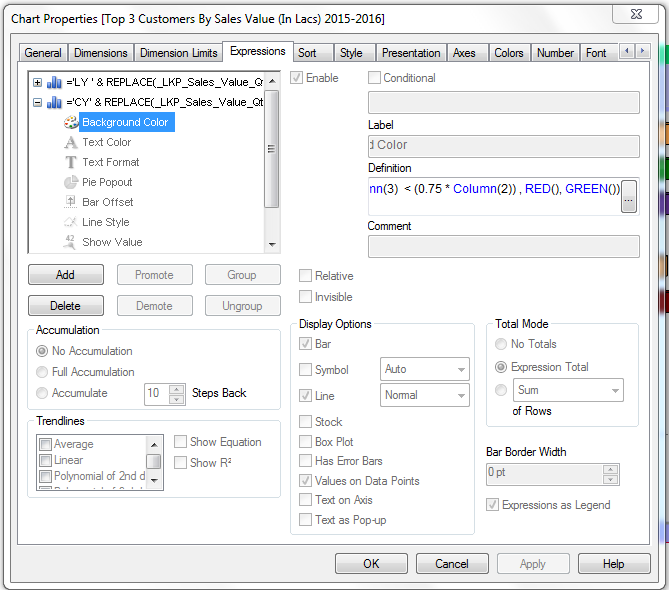
The problem is that i have set three colours orange, green and blue , but if u look at the chart there is one more clour dark red is appearing , how do i remove this colour ? can someone guide me please
- Tags:
- new_to_qlikview
566 Views
1 Solution
Accepted Solutions

 tresB
tresB
Champion III
2015-09-21
01:04 AM
- Mark as New
- Bookmark
- Subscribe
- Mute
- Subscribe to RSS Feed
- Permalink
- Report Inappropriate Content
Expand your second expression ('+'), remove the background color expression.
451 Views
3 Replies
tresB
Champion III
2015-09-21
01:04 AM
- Mark as New
- Bookmark
- Subscribe
- Mute
- Subscribe to RSS Feed
- Permalink
- Report Inappropriate Content
Expand your second expression ('+'), remove the background color expression.
452 Views

 qlikviewwizard
Master II
2015-09-21
01:09 AM
- Mark as New
- Bookmark
- Subscribe
- Mute
- Subscribe to RSS Feed
- Permalink
- Report Inappropriate Content
Hi,
This is because of your back ground color expression for CY Value.
Remove this. It will works.
 prma7799
Master III
2015-09-21
01:15 AM
- Mark as New
- Bookmark
- Subscribe
- Mute
- Subscribe to RSS Feed
- Permalink
- Report Inappropriate Content
PFA
451 Views