Unlock a world of possibilities! Login now and discover the exclusive benefits awaiting you.

- Qlik Community
- :
- All Forums
- :
- QlikView App Dev
- :
- Complex Character Trimming
- Subscribe to RSS Feed
- Mark Topic as New
- Mark Topic as Read
- Float this Topic for Current User
- Bookmark
- Subscribe
- Mute
- Printer Friendly Page

- Mark as New
- Bookmark
- Subscribe
- Mute
- Subscribe to RSS Feed
- Permalink
- Report Inappropriate Content
Complex Character Trimming
Hi Everyone,
As part of my current work - I had to cross reference a selection of part numbers for an application I'm building. While these numbers are correct - the part numbers in the third column here have extra characters tagged on at the end as the picture attached below shows:
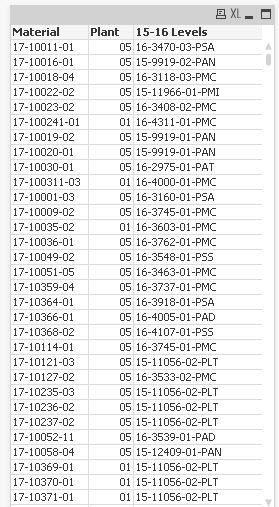
What I would like to do here is remove the characters for part numbers in the 15-16 Levels field that begin with '-P' as this is not the required format for the data to be displayed. Can anyone help to provide an effective way of doing this?
Thanks,
Leigh
Accepted Solutions
- Mark as New
- Bookmark
- Subscribe
- Mute
- Subscribe to RSS Feed
- Permalink
- Report Inappropriate Content
Hi Leigh,
Subfield([15-16 Levels],'-P',1) AS New Field
will just give you the first portion of the field before the '-P'
hope that helps
Joe
- Mark as New
- Bookmark
- Subscribe
- Mute
- Subscribe to RSS Feed
- Permalink
- Report Inappropriate Content
Hi Leigh,
Subfield([15-16 Levels],'-P',1) AS New Field
will just give you the first portion of the field before the '-P'
hope that helps
Joe
- Mark as New
- Bookmark
- Subscribe
- Mute
- Subscribe to RSS Feed
- Permalink
- Report Inappropriate Content
Hi Joe,
Thanks for that.
Worked like a charm!
Thanks,
Leigh
- Mark as New
- Bookmark
- Subscribe
- Mute
- Subscribe to RSS Feed
- Permalink
- Report Inappropriate Content
No problem glad to help.
That only really work if the field value is always -pxxx
if there is potential for that to differ, something like the below might work better.
left( KeepChar([15-16 Levels],'0123456789-') ,index(KeepChar([15-16 Levels],'0123456789-') ,'-',-1) -1)
Joe

 vishsaggi
- Mark as New
- Bookmark
- Subscribe
- Mute
- Subscribe to RSS Feed
- Permalink
- Report Inappropriate Content
Hi,
As Simmons mentioned Subfield which functions stunningly superb.
The below would give you as you required. Provided if the right end of value have only 3 chars after hyphen '-'
left([15-16 Levels], Len([15-16 Levels])-4)
Cheers,
Vish.