Unlock a world of possibilities! Login now and discover the exclusive benefits awaiting you.

- Qlik Community
- :
- All Forums
- :
- QlikView App Dev
- :
- Complex crosstable conversion
- Subscribe to RSS Feed
- Mark Topic as New
- Mark Topic as Read
- Float this Topic for Current User
- Bookmark
- Subscribe
- Mute
- Printer Friendly Page

- Mark as New
- Bookmark
- Subscribe
- Mute
- Subscribe to RSS Feed
- Permalink
- Report Inappropriate Content
Complex crosstable conversion
Hi all,
I needed some help in converting a payslip into a linear table. Currently this is the table I have in Excel:
| 160897 | J Bloggs | Dep 1233 R979 | ||
| Net | 1199.68 | Run date 23/11/12 (21/10/12 - 17/11/12) | ||
| Basic | 160.0000 | @ 8.8400 | 1414.4 | |
| Basic@1.5 | 2.0000 | @ 13.2600 | 26.52 | |
| TOTAL GROSS PAY | 1477.36 | |||
| Gross YTD | 13190.86 | Prev emp pay | 0 | |
| Taxable YTD | 13190.86 | Prev emp tax | 0 | |
| Tax YTD | 1515.2 | |||
| WPBP - LA pay | 13190.86 | |||
| 160898 | A Cloggs | Dep 1233 R979 | ||
| Net | 2323.23 | Run date 23/11/12 (21/10/12 - 17/11/12) | ||
| Basic | 160.0000 | @ 8.8400 | 1213.4 | |
| Basic@1.5 | 2.0000 | @ 13.2600 | 26.52 | |
| TOTAL GROSS PAY | 1477.36 | |||
| Gross YTD | 13190.86 | Prev emp pay | 0 | |
| Taxable YTD | 13190.86 | Prev emp tax | 0 | |
| Tax YTD | 1515.2 | |||
| WPBP - LA pay | 13190.86 | |||
| 160899 | M Bobbs | Dep 1233 R979 | ||
| Net | 4535.76 | Run date 23/11/12 (21/10/12 - 17/11/12) | ||
| Basic | 160.0000 | @ 8.8400 | 1414.4 | |
| Basic@1.5 | 2.0000 | @ 13.2600 | 5345.8 | |
| TOTAL GROSS PAY | 1477.36 | |||
| Gross YTD | 13190.86 | Prev emp pay | 0 | |
| Taxable YTD | 13190.86 | Prev emp tax | 0 | |
| Tax YTD | 1515.2 | |||
| WPBP - LA pay | 13190.86 |
I want to convert it into something like this:
| Net | Basic | @ 8.8400 | Basic@1.5 | @ 13.2600 | Gross YTD | Tax YTD | WPBP - LA pay | Prev emp pay | Prev emp tax | TOTAL GROSS PAY | ||
| 160897 | J Bloggs | 1199.68 | 160.0000 | 1414.4 | 2.0000 | 26.52 | 13190.86 | 1515.2 | 13190.86 | 0 | 0 | 1477.36 |
| 160898 | A Cloggs | 2323.23 | 160.0000 | 1213.4 | 2.0000 | 26.52 | 13190.86 | 1515.2 | 13190.86 | 0 | 0 | 1477.36 |
| 160899 | M Bobbs | 4535.76 | 160.0000 | 5345.8 | 2.0000 | 26.52 | 13190.86 | 1515.2 | 13190.86 | 0 | 0 | 1477.36 |
Message was edited by: sabah dada
- Tags:
- new_to_qlikview
- « Previous Replies
-
- 1
- 2
- Next Replies »
Accepted Solutions

 arsal_90
- Mark as New
- Bookmark
- Subscribe
- Mute
- Subscribe to RSS Feed
- Permalink
- Report Inappropriate Content
Hi Sabah
I used the excel that you provided all i do some thing in the Transformation. So sabah can u please refer this post as Answer for other people help. And if u have any other query then let me know.
Thanks & regards
Muhammad
arsal_90
- Mark as New
- Bookmark
- Subscribe
- Mute
- Subscribe to RSS Feed
- Permalink
- Report Inappropriate Content
can u provide me the excel file
- Mark as New
- Bookmark
- Subscribe
- Mute
- Subscribe to RSS Feed
- Permalink
- Report Inappropriate Content
Please find attached the excel...
arsal_90
- Mark as New
- Bookmark
- Subscribe
- Mute
- Subscribe to RSS Feed
- Permalink
- Report Inappropriate Content
Please find the attached file and let me know that's u want
- Mark as New
- Bookmark
- Subscribe
- Mute
- Subscribe to RSS Feed
- Permalink
- Report Inappropriate Content
Muhammad,
Thank you for this. However, I have a few more questions to ask following this....
1) For the category LIEU, J.Bloggs has doesn't have any values, only A.Bloggs has a LIEU value of 3.00. If I select J Bloggs, I should not get any values. Rather it is duplicating the value as seen in the example below.

2) I cannot see any of my Total Gross Pay values e.g. Gross YTD, Taxable YTD,
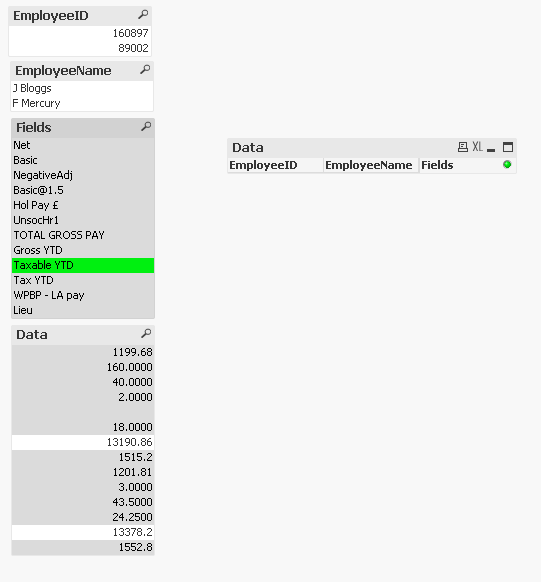
How can these be solved?
Many thanks for your help in advance.
arsal_90
- Mark as New
- Bookmark
- Subscribe
- Mute
- Subscribe to RSS Feed
- Permalink
- Report Inappropriate Content
Hi sabah
Basically your payslip format is too complicated please formatize your pay slip format because in this format it can't be resolved by cross table. But i will try else if you can formatize a standard pattern for this then it will be good
- Mark as New
- Bookmark
- Subscribe
- Mute
- Subscribe to RSS Feed
- Permalink
- Report Inappropriate Content
Hi Muhammad,
I agree with you. But unfortunately I can't change the format of the payslip. There are many thousands of payslips that come in each month, so i will need to work with this format.
Ideally I wanted to format the payslip in a different manner, which would make it simpler.
- Mark as New
- Bookmark
- Subscribe
- Mute
- Subscribe to RSS Feed
- Permalink
- Report Inappropriate Content
Have you tried editing the payslips in the Load Wizard (Enable Transformation Step)?
Cheers,
Lucas
arsal_90
- Mark as New
- Bookmark
- Subscribe
- Mute
- Subscribe to RSS Feed
- Permalink
- Report Inappropriate Content
ok tell me what the output result u want from that. please let me according to that excel file that u provided and also let me what fields is neccessary or what is not
- Mark as New
- Bookmark
- Subscribe
- Mute
- Subscribe to RSS Feed
- Permalink
- Report Inappropriate Content
Lucas,
I have yes. I have tried to split the payslip into two. Employee Details and Data. But not obtaining the correct results..
Employee_Details:
LOAD @1 as EmployeeID,
@2 as EmployeeName
FROM
[Copy of Payroll02ManreportsPer09.xls]
(biff, no labels, table is [ctt$], filters(
Remove(Row, Pos(Top, 2)),
Remove(Row, Pos(Top, 2)),
Remove(Row, Pos(Top, 2)),
Remove(Row, Pos(Top, 2)),
Remove(Row, Pos(Top, 2)),
Remove(Row, Pos(Top, 2)),
Remove(Row, Pos(Top, 2)),
Remove(Row, Pos(Top, 2)),
Remove(Row, Pos(Top, 2)),
Remove(Row, Pos(Top, 2)),
Remove(Row, Pos(Top, 2)),
Remove(Row, Pos(Top, 3)),
Remove(Row, Pos(Top, 3)),
Remove(Row, Pos(Top, 3)),
Remove(Row, Pos(Top, 3)),
Remove(Row, Pos(Top, 3)),
Remove(Row, Pos(Top, 3)),
Remove(Row, Pos(Top, 3)),
Remove(Row, Pos(Top, 3)),
Remove(Row, Pos(Top, 3)),
Remove(Row, Pos(Top, 3)),
Remove(Row, Pos(Top, 4)),
Remove(Row, Pos(Top, 4)),
Remove(Row, Pos(Top, 4)),
Remove(Row, Pos(Top, 4)),
Remove(Row, Pos(Top, 4)),
Remove(Row, Pos(Top, 4)),
Remove(Row, Pos(Top, 4)),
Remove(Row, Pos(Top, 4)),
Remove(Row, Pos(Top, 4)),
Remove(Row, Pos(Top, 4))
));
Data:
LOAD
@1 as Fields,
@2 as Data
FROM
[Copy of Payroll02ManreportsPer09.xls]
(biff, no labels, table is [ctt$], filters(
Remove(Row, Pos(Top, 1)),
Remove(Row, Pos(Top, 12)),
Remove(Row, Pos(Top, 22))
));
- « Previous Replies
-
- 1
- 2
- Next Replies »