Unlock a world of possibilities! Login now and discover the exclusive benefits awaiting you.

- Qlik Community
- :
- All Forums
- :
- QlikView App Dev
- :
- Converting Time Formats
- Subscribe to RSS Feed
- Mark Topic as New
- Mark Topic as Read
- Float this Topic for Current User
- Bookmark
- Subscribe
- Mute
- Printer Friendly Page

 mccook
- Mark as New
- Bookmark
- Subscribe
- Mute
- Subscribe to RSS Feed
- Permalink
- Report Inappropriate Content
Converting Time Formats
Hi,
I have 2 fields, a start time and an end time and I want to work out the time taken, however the two fields are in different formats:
| Start Time | End Time | Duration (Required) |
|---|---|---|
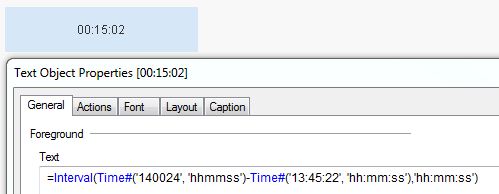
| 13:45:22 | 140024 | 00:15:02 |
The field start time is formatted as hh:mm:ss however the end time is just a number, I believe I need to either convert the start time to a number or the end time to hh:mm:ss to then work out the duration.
Any advice would be appreciated?
Cheers,
Dean
- « Previous Replies
-
- 1
- 2
- Next Replies »
Accepted Solutions

 MarcoWedel
- Mark as New
- Bookmark
- Subscribe
- Mute
- Subscribe to RSS Feed
- Permalink
- Report Inappropriate Content
Hi,
if you really want seperate fields for date and time (instead of just formating the same field to show time in one case and date in the other), you could do like this:
QMC:
LOAD *,
    Interval([End Date Time]-[Start Date Time]) as Duration;
LOAD *,
    Timestamp([Start Date]+[Start Time]) as [Start Date Time];
LOAD Date(Floor(Date)) as [End Date],
  Time(Frac(Date)) as [End Time],
  Timestamp(Date) as [End Date Time],
  SubField(SubField(FileInfo,'\',10),'-',2) as [Task],
  Time(Time#(Left(SubField(FileInfo,'\',10),6),'hhmmss')) as [Start Time],
  Date(Date#(SubField(FileInfo,'\',9),'YYYYMMDD')) as [Start Date]
FROM [S1 - QMC1.QVD](qvd);
I also added a combined date time field for start and end.
Are you sure about start and end sources, because the difference is negative?
To calculate the interval, you should always use full timestamps, because using only the time part could cause issues when the task runs from one day to another.
hope this helps
regards
Marco
MarcoWedel
- Mark as New
- Bookmark
- Subscribe
- Mute
- Subscribe to RSS Feed
- Permalink
- Report Inappropriate Content
Interval(Time#([End Time], 'hhmmss')-Time#([Start Time], 'hh:mm:ss'),'hh:mm:ss') as Duration
MarcoWedel
- Mark as New
- Bookmark
- Subscribe
- Mute
- Subscribe to RSS Feed
- Permalink
- Report Inappropriate Content
mccook
- Mark as New
- Bookmark
- Subscribe
- Mute
- Subscribe to RSS Feed
- Permalink
- Report Inappropriate Content
thanks, it doesn't seem to work for me, possibly because of the way I created the fields as below:
Date(Date,'hhmmss') as [End Time]
left(subfield(FileInfo,'\',10),6) as [Start Time]
MarcoWedel
- Mark as New
- Bookmark
- Subscribe
- Mute
- Subscribe to RSS Feed
- Permalink
- Report Inappropriate Content
So your End Time is already a dual value.
Maybe
Interval([End Time]-Time#([Start Time], 'hh:mm:ss'),'hh:mm:ss') as Duration
works for you.
If not, please post your app with sample data.
thanks
regards
Marco
mccook
- Mark as New
- Bookmark
- Subscribe
- Mute
- Subscribe to RSS Feed
- Permalink
- Report Inappropriate Content
Hi Marco,
Still no joy, I've attached a sample.
Cheers
Dean
MarcoWedel
- Mark as New
- Bookmark
- Subscribe
- Mute
- Subscribe to RSS Feed
- Permalink
- Report Inappropriate Content
Hi,
if you really want seperate fields for date and time (instead of just formating the same field to show time in one case and date in the other), you could do like this:
QMC:
LOAD *,
    Interval([End Date Time]-[Start Date Time]) as Duration;
LOAD *,
    Timestamp([Start Date]+[Start Time]) as [Start Date Time];
LOAD Date(Floor(Date)) as [End Date],
  Time(Frac(Date)) as [End Time],
  Timestamp(Date) as [End Date Time],
  SubField(SubField(FileInfo,'\',10),'-',2) as [Task],
  Time(Time#(Left(SubField(FileInfo,'\',10),6),'hhmmss')) as [Start Time],
  Date(Date#(SubField(FileInfo,'\',9),'YYYYMMDD')) as [Start Date]
FROM [S1 - QMC1.QVD](qvd);
I also added a combined date time field for start and end.
Are you sure about start and end sources, because the difference is negative?
To calculate the interval, you should always use full timestamps, because using only the time part could cause issues when the task runs from one day to another.
hope this helps
regards
Marco
mccook
- Mark as New
- Bookmark
- Subscribe
- Mute
- Subscribe to RSS Feed
- Permalink
- Report Inappropriate Content
Perfect, I guess it makes sense that it needs the date included to work out duration.
Thanks,
Dean
MarcoWedel
- Mark as New
- Bookmark
- Subscribe
- Mute
- Subscribe to RSS Feed
- Permalink
- Report Inappropriate Content
Using only Timestamp fields for start and end:
QMC:
LOAD *,
    Interval([End Date Time]-[Start Date Time]) as Duration;
LOAD Timestamp(Timestamp#(SubField(FileInfo,'\',9)&Left(SubField(FileInfo,'\',10),6),'YYYYMMDDhhmmss')) as [Start Date Time],
  Timestamp(Date) as [End Date Time],
  Trim(SubField(SubField(FileInfo,'\',10),'-',2)) as [Task]
FROM [S1 - QMC1.QVD](qvd);

with calculated date and time fields in the frontend:

hope this helps
regards
Marco
mccook
- Mark as New
- Bookmark
- Subscribe
- Mute
- Subscribe to RSS Feed
- Permalink
- Report Inappropriate Content
thanks again.

- « Previous Replies
-
- 1
- 2
- Next Replies »