Unlock a world of possibilities! Login now and discover the exclusive benefits awaiting you.

- Qlik Community
- :
- All Forums
- :
- QlikView App Dev
- :
- Count formula not working
- Subscribe to RSS Feed
- Mark Topic as New
- Mark Topic as Read
- Float this Topic for Current User
- Bookmark
- Subscribe
- Mute
- Printer Friendly Page

 cquesenbery
- Mark as New
- Bookmark
- Subscribe
- Mute
- Subscribe to RSS Feed
- Permalink
- Report Inappropriate Content
Count formula not working
I need some help - I have tried many versions of " Count( {<[Total Units] = {“>=1”}>}DISTINCT [PatientID] )" and nothing is working. My original " Count (DISTINCT [PatientID]) "works but what I would like to do is only count distinct patients if the preceding column (Total Units) is greater than or equal to 1. What am I missing? Should I try an if statement? Thanks CQ
Accepted Solutions
cquesenbery
- Mark as New
- Bookmark
- Subscribe
- Mute
- Subscribe to RSS Feed
- Permalink
- Report Inappropriate Content
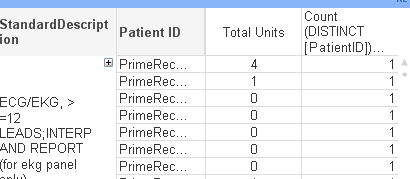
This is what my chart looks like currently - I would like to only count the distinct patients if the total units are greater than 0 or >=1.

 swuehl
- Mark as New
- Bookmark
- Subscribe
- Mute
- Subscribe to RSS Feed
- Permalink
- Report Inappropriate Content
What do you mean with "preceding column"?
[Total Units] need to be a field in the model if you want it to use like that.
How do the field values of [Total Units] look like? How are the fields related?
What is returned from your expression and what do you expect?
cquesenbery
- Mark as New
- Bookmark
- Subscribe
- Mute
- Subscribe to RSS Feed
- Permalink
- Report Inappropriate Content
This is what my chart looks like currently - I would like to only count the distinct patients if the total units are greater than 0 or >=1.
swuehl
- Mark as New
- Bookmark
- Subscribe
- Mute
- Subscribe to RSS Feed
- Permalink
- Report Inappropriate Content
So Total Unit is an expression?
=If("Total Units" >0, Count(DISTINCT PatientID) )
or
If(Column(1) >0, ....)
swuehl
- Mark as New
- Bookmark
- Subscribe
- Mute
- Subscribe to RSS Feed
- Permalink
- Report Inappropriate Content
Or maybe I misunderstood your request?
How does your expression look like?
cquesenbery
- Mark as New
- Bookmark
- Subscribe
- Mute
- Subscribe to RSS Feed
- Permalink
- Report Inappropriate Content
That worked - thank you so much for your help!!
