Unlock a world of possibilities! Login now and discover the exclusive benefits awaiting you.

- Qlik Community
- :
- All Forums
- :
- QlikView App Dev
- :
- Cross table
- Subscribe to RSS Feed
- Mark Topic as New
- Mark Topic as Read
- Float this Topic for Current User
- Bookmark
- Subscribe
- Mute
- Printer Friendly Page

 krishna20
- Mark as New
- Bookmark
- Subscribe
- Mute
- Subscribe to RSS Feed
- Permalink
- Report Inappropriate Content
Cross table
Hi folks,
Having a problem in creating cross table. I'm having product sales as month wise. I need to calculate it ,as overall in single column.I need to create a month field as well as year field in the cross table.Please find the attached sample excel data.
- Tags:
- new_to_qlikview
Accepted Solutions

 sunny_talwar
- Mark as New
- Bookmark
- Subscribe
- Mute
- Subscribe to RSS Feed
- Permalink
- Report Inappropriate Content
Try this:
Table:
CrossTable(Month, Value, 5)
LOAD Freezer_ID,
Category_ID,
Freezer_Name,
Year,
[TOTAL SALES],
JAN,
FEB,
MAR,
APR,
MAY,
JUNE,
JULY,
AUG,
SEP,
OCT,
NOV
FROM
Test_Help.xlsx
(ooxml, embedded labels, table is Sheet1);
NewTable:
LOAD Freezer_ID,
Category_ID,
Freezer_Name,
[TOTAL SALES],
MonthName(MakeDate(Year, Month(Alt(Date#(Month, 'MMM'), Date#(Month, 'MMMM'))), 1)) as MonthYear,
Value
Resident Table;
DROP Table Table;

- Mark as New
- Bookmark
- Subscribe
- Mute
- Subscribe to RSS Feed
- Permalink
- Report Inappropriate Content
Try this at script level:
CrossTable(Month, Data_Value, 3)
LOAD Freezer_ID,
Category_ID,
Freezer_Name,
JAN,
FEB,
MAR,
APR,
MAY,
JUNE,
JULY,
AUG,
SEP,
OCT,
NOV,
[TOTAL SALES]
FROM
(ooxml, embedded labels, table is Sheet1);
sunny_talwar
- Mark as New
- Bookmark
- Subscribe
- Mute
- Subscribe to RSS Feed
- Permalink
- Report Inappropriate Content
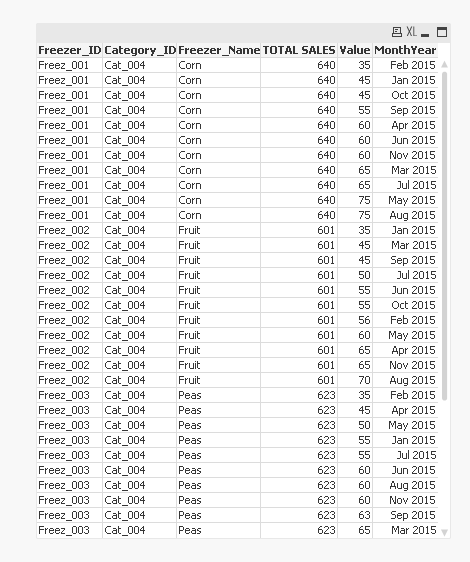
Not sure where the year information is, but assuming everything is 2015, may be this:
Table:
CrossTable(Month, Value, 4)
LOAD Freezer_ID,
Category_ID,
Freezer_Name,
[TOTAL SALES],
JAN,
FEB,
MAR,
APR,
MAY,
JUNE,
JULY,
AUG,
SEP,
OCT,
NOV
FROM
Test_Help.xlsx
(ooxml, embedded labels, table is Sheet1);
NewTable:
LOAD Freezer_ID,
Category_ID,
Freezer_Name,
[TOTAL SALES],
MonthName(MakeDate(2015, Month(Alt(Date#(Month, 'MMM'), Date#(Month, 'MMMM'))), 1)) as MonthYear,
Value
Resident Table;
DROP Table Table;
- Mark as New
- Bookmark
- Subscribe
- Mute
- Subscribe to RSS Feed
- Permalink
- Report Inappropriate Content
PFA...Hope this will help
 Chanty4u
- Mark as New
- Bookmark
- Subscribe
- Mute
- Subscribe to RSS Feed
- Permalink
- Report Inappropriate Content
PFa
krishna20
- Mark as New
- Bookmark
- Subscribe
- Mute
- Subscribe to RSS Feed
- Permalink
- Report Inappropriate Content
Hi Sunny,
Thank you for your prompt reply. Absolutely right solution.
But, how can i insert years in excel or qlikview app??
I mean how i show current year and previous year sales. Please show light on this issue.
sunny_talwar
- Mark as New
- Bookmark
- Subscribe
- Mute
- Subscribe to RSS Feed
- Permalink
- Report Inappropriate Content
May be you can add it as a column?

If this is acceptable, I can send you an updated script
krishna20
- Mark as New
- Bookmark
- Subscribe
- Mute
- Subscribe to RSS Feed
- Permalink
- Report Inappropriate Content
Yes Sunny . It's acceptable.Can you please share updated script..
sunny_talwar
- Mark as New
- Bookmark
- Subscribe
- Mute
- Subscribe to RSS Feed
- Permalink
- Report Inappropriate Content
Try this:
Table:
CrossTable(Month, Value, 5)
LOAD Freezer_ID,
Category_ID,
Freezer_Name,
Year,
[TOTAL SALES],
JAN,
FEB,
MAR,
APR,
MAY,
JUNE,
JULY,
AUG,
SEP,
OCT,
NOV
FROM
Test_Help.xlsx
(ooxml, embedded labels, table is Sheet1);
NewTable:
LOAD Freezer_ID,
Category_ID,
Freezer_Name,
[TOTAL SALES],
MonthName(MakeDate(Year, Month(Alt(Date#(Month, 'MMM'), Date#(Month, 'MMMM'))), 1)) as MonthYear,
Value
Resident Table;
DROP Table Table;
krishna20
- Mark as New
- Bookmark
- Subscribe
- Mute
- Subscribe to RSS Feed
- Permalink
- Report Inappropriate Content
Thank You Very Much Sunny..