Unlock a world of possibilities! Login now and discover the exclusive benefits awaiting you.

- Qlik Community
- :
- All Forums
- :
- QlikView App Dev
- :
- Cumulative Sum
- Subscribe to RSS Feed
- Mark Topic as New
- Mark Topic as Read
- Float this Topic for Current User
- Bookmark
- Subscribe
- Mute
- Printer Friendly Page

 katetsan
- Mark as New
- Bookmark
- Subscribe
- Mute
- Subscribe to RSS Feed
- Permalink
- Report Inappropriate Content
Cumulative Sum
Hi Communities,
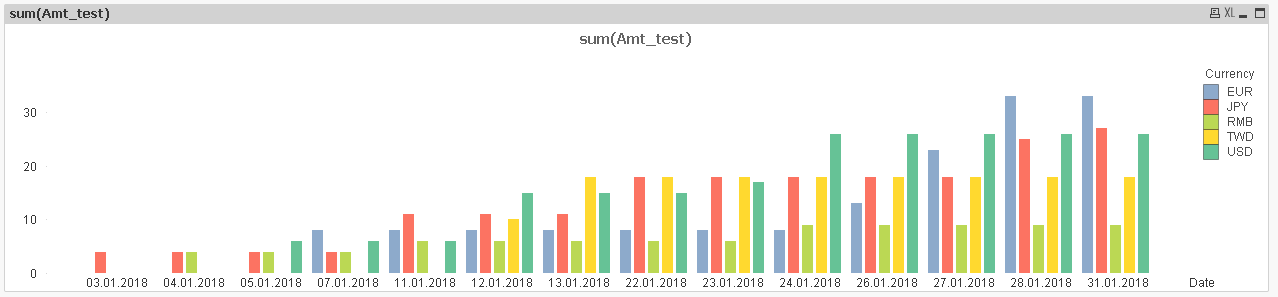
I was trying to create a bar chart with cumulative value by date and currency type, but the result doesn't work well.
Formula is as below:
Pick(match(Valuelist('TWD','RMB','USD','JPY','EUR'),'TWD','RMB','USD','JPY','EUR'),
Rangesum( above(Sum({<Currency={'TWD'}>}Amt_test), 0, RowNo())),
Rangesum( above(Sum({<Currency={'RMB'}>}Amt_test), 0, RowNo())),
Rangesum( above(Sum({<Currency={'USD'}>}Amt_test), 0, RowNo())),
Rangesum( above(Sum({<Currency={'JPY'}>}Amt_test), 0, RowNo())),
Rangesum( above(Sum({<Currency={'EUR'}>}Amt_test), 0, RowNo()))
)
Dimensions:
1. Date
2. ValueList('TWD','RMB','USD','JPY','EUR')
Is there anyone could give some advice?
Thanks in advanced.

 Sergey_Shuklin
- Mark as New
- Bookmark
- Subscribe
- Mute
- Subscribe to RSS Feed
- Permalink
- Report Inappropriate Content
Hello, Kate!
If you don't have zero-rows of current currency and date, even ValueList() won't help. Try to add empty rows in the script and then use Full Accumulation with unchecked Suppress Zero Values.