Unlock a world of possibilities! Login now and discover the exclusive benefits awaiting you.

- Qlik Community
- :
- All Forums
- :
- QlikView App Dev
- :
- Custom Sort
- Subscribe to RSS Feed
- Mark Topic as New
- Mark Topic as Read
- Float this Topic for Current User
- Bookmark
- Subscribe
- Mute
- Printer Friendly Page

- Mark as New
- Bookmark
- Subscribe
- Mute
- Subscribe to RSS Feed
- Permalink
- Report Inappropriate Content
Custom Sort
I am pretty newish to Qlikview and I am trying to custom sort a listbox I created.
Currently the data in the listbox looks like this:
0000-0600
0600-1200
0600-1800 (Officer)
0900-1500
1200-1800
1800-0600 (Officer)
1800-2400
What I want is this:
0000-0600
0600-1200
0900-1500
1200-1800
1800-2400
0600-1800 (Officer)
1800-0600 (Officer)
Any ideas?
Thanks
~Norman Rea
- Tags:
- new_to_qlikview
- « Previous Replies
-
- 1
- 2
- Next Replies »
- Mark as New
- Bookmark
- Subscribe
- Mute
- Subscribe to RSS Feed
- Permalink
- Report Inappropriate Content
I did check it and it has no effect. I feel that my listbox is just text.
~Norm

 Peter_Cammaert
- Mark as New
- Bookmark
- Subscribe
- Mute
- Subscribe to RSS Feed
- Permalink
- Report Inappropriate Content
This looks stupid, but it works:
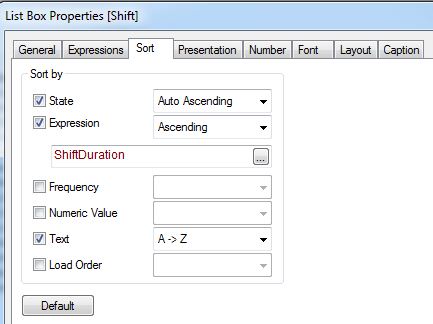
Set the Sort Order of your listbox to Expression, and enter this expression into the corresponding field:
=num(left(Recs, 4)) + div(len(Recs),10)*10000
If your field uses a different name, then replace all occurrences of Recs with that name. See attachment.
Best,
Peter
 jagan
jagan
- Mark as New
- Bookmark
- Subscribe
- Mute
- Subscribe to RSS Feed
- Permalink
- Report Inappropriate Content
Hi,
Try like this
LOAD
*
FROM
ColumnName
0000-0600
0600-1200
0900-1500
1200-1800
1800-2400
0600-1800 (Officer)
1800-0600 (Officer) ];
YourTableName:
LOAD
ColumnName,
'
'
'
'
FROM DataSource;
Now in Sort tab select Load Order.
- Mark as New
- Bookmark
- Subscribe
- Mute
- Subscribe to RSS Feed
- Permalink
- Report Inappropriate Content
Getting close....The data I load comes from Excel. It pulls the different shifts into Qlikview in a variety of orders depending on how people in my fire station sign up for duty.
~Norm
Peter_Cammaert
- Mark as New
- Bookmark
- Subscribe
- Mute
- Subscribe to RSS Feed
- Permalink
- Report Inappropriate Content
Did you try one more last time with a Sort Expression?
- Mark as New
- Bookmark
- Subscribe
- Mute
- Subscribe to RSS Feed
- Permalink
- Report Inappropriate Content
This is an example of the Excel Table I am pulling into Qlikview.
| Date | Member | Crew | Shift | Coverage |
| 1/1/2014 | Britt Williams | Duty Schedule | 0000-0600 | Complete Shift |
| 1/1/2014 | Amanda Dean | Duty Schedule | 0000-0600 | Complete Shift |
| 1/1/2014 | Britt Williams | Duty Schedule | 0600-1200 | Complete Shift |
| 1/1/2014 | Amanda Dean | Duty Schedule | 0600-1200 | Complete Shift |
| 1/1/2014 | David Hanson | Duty Schedule | 1200-1800 | Complete Shift |
| 1/1/2014 | Britt Williams | Duty Schedule | 1200-1800 | Complete Shift |
| 1/1/2014 | James Morgan | Duty Schedule | 1800-2400 | Complete Shift |
| 1/1/2014 | Preston Pratt | Duty Schedule | 1800-2400 | Complete Shift |
| 1/2/2014 | Charles Dowell | Duty Officer | 1800-0600 | Complete Shift |
| 1/2/2014 | James Morgan | Duty Schedule | 0000-0600 | Complete Shift |
| 1/2/2014 | Preston Pratt | Duty Schedule | 0900-1500 | Complete Shift |
| 1/2/2014 | Kiersten Shea | Duty Schedule | 1200-1800 | Complete Shift |
| 1/2/2014 | Michael Heim | Duty Officer | 0600-1800 | Complete Shift |
| 1/3/2014 | Rick Tallman | Duty Schedule | 0000-0600 | Complete Shift |
- Mark as New
- Bookmark
- Subscribe
- Mute
- Subscribe to RSS Feed
- Permalink
- Report Inappropriate Content
I got it working with a combo of the expression Len and Text Sort. Only new issue I found is that once you select something the sorting function is thrown out the window. Any clues on that?
~Norm

 jduenyas
- Mark as New
- Bookmark
- Subscribe
- Mute
- Subscribe to RSS Feed
- Permalink
- Report Inappropriate Content
Norm
From the attached spreadsheet you provided the column Shift does not have the word '(Officer)' attached to it.
It seems that you are concatenating that at load time(?) The sort is Alpha sort and not numeric therefor the 2 rows that include (officer) are not at the bottom as you want it in the sample you provided.
You will have to create a separate key (or field) on which to sort, preferably numeric. The sort should not be changed or affected at time of selecting a line and then releasing the selection.
Hope this helps.
Josh
- Mark as New
- Bookmark
- Subscribe
- Mute
- Subscribe to RSS Feed
- Permalink
- Report Inappropriate Content
Hi.
You can prepare an excel with two column as the following table:
Shift Shift_sort
0000-0600 1
0600-1200 2
0900-1500 3
1200-1800 4
1800-2400 5
0600-1800 (Officer) 6
1800-0600 (Officer) 7
Then, in editor script, after loading your data, you should make a left join with this table so you will have a new field: you can use Shift_sort as expression in tab Sort of your listbox (flag option "Expression" and insert just the field name Shift_sort).
Elena

 MarcoWedel
- Mark as New
- Bookmark
- Subscribe
- Mute
- Subscribe to RSS Feed
- Permalink
- Report Inappropriate Content
Hi,
given your sample data, I guess one solution might be:
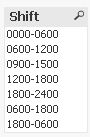
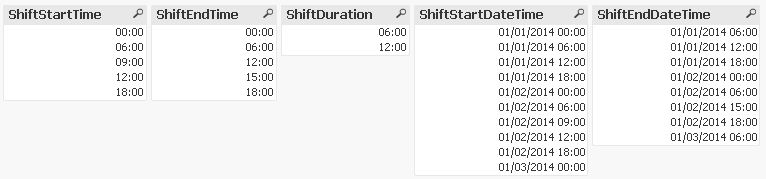
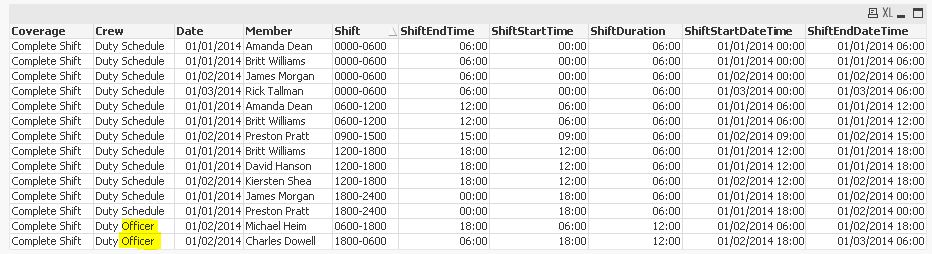
tabShifts:
LOAD *,
    Timestamp(Date+ShiftStartTime, 'MM/DD/YYYY hh:mm') as ShiftStartDateTime,
    Timestamp(Date+ShiftStartTime+ShiftDuration, 'MM/DD/YYYY hh:mm') as ShiftEndDateTime;
LOAD *,
    Interval(ShiftEndTime-(ShiftEndTime<ShiftStartTime)-ShiftStartTime,'hh:mm') as ShiftDuration;
LOAD Date,
    Member,
    Crew,
    Shift,
    Time(Time#(SubField(Shift,'-',1),'hhmm'),'hh:mm') as ShiftStartTime,
    Time(Time#(SubField(Shift,'-',2),'hhmm'),'hh:mm') as ShiftEndTime,
    Coverage
FROM [http://community.qlik.com/servlet/JiveServlet/download/657236-137574/Duty%20Data%20Example.xlsx]
(ooxml, embedded labels, table is Sheet1);
hope this helps
regards
Marco
- « Previous Replies
-
- 1
- 2
- Next Replies »