Unlock a world of possibilities! Login now and discover the exclusive benefits awaiting you.

- Qlik Community
- :
- All Forums
- :
- QlikView App Dev
- :
- Days
- Subscribe to RSS Feed
- Mark Topic as New
- Mark Topic as Read
- Float this Topic for Current User
- Bookmark
- Subscribe
- Mute
- Printer Friendly Page

 smilingjohn
- Mark as New
- Bookmark
- Subscribe
- Mute
- Subscribe to RSS Feed
- Permalink
- Report Inappropriate Content
Days
Hi All,
Please find the attachment of the QVW file and the related data .
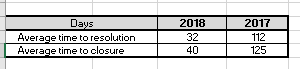
I need to show AVG of Resolved date and for Closed date for 2018 and 2017 for the Key .
For resolved date = resolved - Created is the formula for it ..
For Closed = Closed-Created .
How do i get this ?..
I need to show current and previous year for Resolved date .
As shown in the screenshot below
Thanks in advance .
Accepted Solutions

 jyothish8807
- Mark as New
- Bookmark
- Subscribe
- Mute
- Subscribe to RSS Feed
- Permalink
- Report Inappropriate Content
Hi John,
I just added Status field as per my understanding, you ca remove them or change the status as per your requirment.
'd' stands for days, i am taking the interval between both the dates in 'days' and then taking the avg of it.
Br,
KC
KC

- Mark as New
- Bookmark
- Subscribe
- Mute
- Subscribe to RSS Feed
- Permalink
- Report Inappropriate Content
define a Pivot table with
calculated Dimension =if (Resolvedyear>=2017, Resolvedyear)
and two expressions
-=avg(date(Resolved)-date(Created))
=avg(date(Closed)-date(Created))
and bring Dimension and expressions in this Format (drag and drop)

jyothish8807
- Mark as New
- Bookmark
- Subscribe
- Mute
- Subscribe to RSS Feed
- Permalink
- Report Inappropriate Content
Hi John,
Check this sample.
Br,
KC
KC
smilingjohn
- Mark as New
- Bookmark
- Subscribe
- Mute
- Subscribe to RSS Feed
- Permalink
- Report Inappropriate Content
Hi Jyothish,
Why are you considering the status ? and what is D here ?
Thanks
jyothish8807
- Mark as New
- Bookmark
- Subscribe
- Mute
- Subscribe to RSS Feed
- Permalink
- Report Inappropriate Content
Hi John,
I just added Status field as per my understanding, you ca remove them or change the status as per your requirment.
'd' stands for days, i am taking the interval between both the dates in 'days' and then taking the avg of it.
Br,
KC
KC