Unlock a world of possibilities! Login now and discover the exclusive benefits awaiting you.

- Qlik Community
- :
- All Forums
- :
- QlikView App Dev
- :
- Document State Removed
- Subscribe to RSS Feed
- Mark Topic as New
- Mark Topic as Read
- Float this Topic for Current User
- Bookmark
- Subscribe
- Mute
- Printer Friendly Page

 fkeuroglian
- Mark as New
- Bookmark
- Subscribe
- Mute
- Subscribe to RSS Feed
- Permalink
- Report Inappropriate Content
Document State Removed
Hi Expert
I want to acces via acces point to a qlikview app and i do not have any browser option when i clic in my app.
Only see the option DOCUMENT STATE REMOVED, and i can not acces to the qvw.
I try in differents browser, such as chrome, iexplorer and mozilla
What could be
Thanks a lot
Attached and image to see example


 swuehl
- Mark as New
- Bookmark
- Subscribe
- Mute
- Subscribe to RSS Feed
- Permalink
- Report Inappropriate Content
Are you saying that you can't open the QVW when clicking on the thumbnail?
It seems that you don't have the IE plugin installed, so there might not be the need to show different client options.
fkeuroglian
- Mark as New
- Bookmark
- Subscribe
- Mute
- Subscribe to RSS Feed
- Permalink
- Report Inappropriate Content
Hi Stefan
i can not access if i click in the thumbail
swuehl
- Mark as New
- Bookmark
- Subscribe
- Mute
- Subscribe to RSS Feed
- Permalink
- Report Inappropriate Content
And there is no message popping up? Does this happen only with one or all QVW?
 saimahasan
- Mark as New
- Bookmark
- Subscribe
- Mute
- Subscribe to RSS Feed
- Permalink
- Report Inappropriate Content
Can you please share the screenshot after clicking on the thumbnail.??
 phaneendra_kunc
- Mark as New
- Bookmark
- Subscribe
- Mute
- Subscribe to RSS Feed
- Permalink
- Report Inappropriate Content
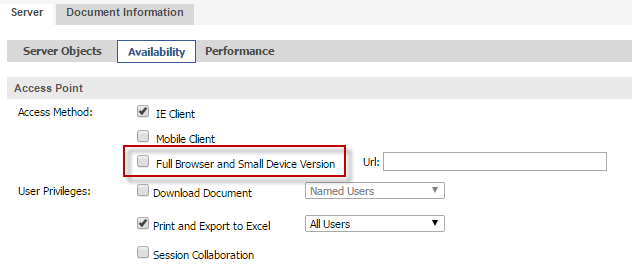
Seems like below option is unchecked in QMC for this app.
QMC --> User Documents --> select your QVW --> Check Full Browser and small device version.