Unlock a world of possibilities! Login now and discover the exclusive benefits awaiting you.

- Qlik Community
- :
- All Forums
- :
- QlikView App Dev
- :
- Double "Total" label at pivot table.
- Subscribe to RSS Feed
- Mark Topic as New
- Mark Topic as Read
- Float this Topic for Current User
- Bookmark
- Subscribe
- Mute
- Printer Friendly Page

- Mark as New
- Bookmark
- Subscribe
- Mute
- Subscribe to RSS Feed
- Permalink
- Report Inappropriate Content
Double "Total" label at pivot table.
Hello, I'm developing a pivot table that contains two expressions (expenses or gastos) and (budgets or presupuesto)using three dimensions (year, month, account). I ordered the account as the horizontal dimension and as my columns: (top to bottom) expression, year, month. I'm using the subtotal in the month dimension but I'm getting a double "total" label.
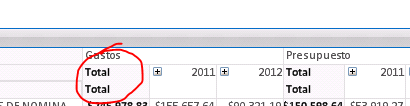
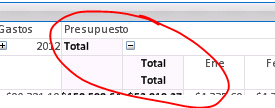
Does anyone know who to solve this?
Accepted Solutions

 pover
pover
- Mark as New
- Bookmark
- Subscribe
- Mute
- Subscribe to RSS Feed
- Permalink
- Report Inappropriate Content
I was able to replicate the visual problem and I think the best workaround is to define the Totals label for that dimension to be <space> and eliminate the label from the table.
Karl
pover
- Mark as New
- Bookmark
- Subscribe
- Mute
- Subscribe to RSS Feed
- Permalink
- Report Inappropriate Content
I was able to replicate the visual problem and I think the best workaround is to define the Totals label for that dimension to be <space> and eliminate the label from the table.
Karl
- Mark as New
- Bookmark
- Subscribe
- Mute
- Subscribe to RSS Feed
- Permalink
- Report Inappropriate Content
I guess so. Thanks for your help!

 diego_a_barboza
- Mark as New
- Bookmark
- Subscribe
- Mute
- Subscribe to RSS Feed
- Permalink
- Report Inappropriate Content
I've contacted my local support team regarding that last week and they haven't any news yet, just told me they are still researching.
It's likely that is a bug.