Unlock a world of possibilities! Login now and discover the exclusive benefits awaiting you.

- Qlik Community
- :
- All Forums
- :
- QlikView App Dev
- :
- Excluding data.
- Subscribe to RSS Feed
- Mark Topic as New
- Mark Topic as Read
- Float this Topic for Current User
- Bookmark
- Subscribe
- Mute
- Printer Friendly Page

- Mark as New
- Bookmark
- Subscribe
- Mute
- Subscribe to RSS Feed
- Permalink
- Report Inappropriate Content
Excluding data.
Hey all!
I am looking for a way to exclude certain data from my results.
On a daily business we receive information about our 'devices' each device has an unique ID.
However some devices have a Main and several Sub Units.
Then they have a -00 behind their ID for Main unit
Or -01/02/03/04 as a Sub unit as shown below:
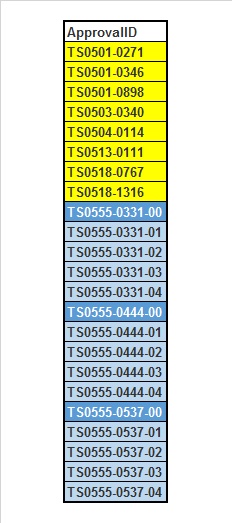
Yellow is a normal Device, Dark blue is Main Unit, Ugly blue is Sub unit.
Now for my calculations i need to take all of them exept for the Main Units as they have no revenue and kill the average.
So my question to all of you is: how do i exclude those?
- Tags:
- new_to_qlikview
Accepted Solutions

 tresB
tresB
- Mark as New
- Bookmark
- Subscribe
- Mute
- Subscribe to RSS Feed
- Permalink
- Report Inappropriate Content
Try like:
MACRecord:
LOAD
Kostenplaats,
Vestiging,
ObjectID,
ApprovalID
FROM
(qvd)
where Not Wildmatch( ApprovalID, '*-00') ;
- Mark as New
- Bookmark
- Subscribe
- Mute
- Subscribe to RSS Feed
- Permalink
- Report Inappropriate Content
if you donot want the yellow onces (the devices) and not the main Units (dark blue) you may use
if (len(ApprovalID)>11) and right (ApprovalID,2) <> '00', ApprovalID)
the first condition skips the devices, while the second condition skips the main Units (ending with 00)
- Mark as New
- Bookmark
- Subscribe
- Mute
- Subscribe to RSS Feed
- Permalink
- Report Inappropriate Content
No i do want the yellow ones.
All i want to exclude is dark Blue.

 jonathandienst
- Mark as New
- Bookmark
- Subscribe
- Mute
- Subscribe to RSS Feed
- Permalink
- Report Inappropriate Content
In script (QV):
Where Right(ApprovalID, 3) = '-00'
or
Where SubField(ApprovalID, '-', 3) = '00'
jonathandienst
- Mark as New
- Bookmark
- Subscribe
- Mute
- Subscribe to RSS Feed
- Permalink
- Report Inappropriate Content
In set expression in the front end:
{<ApprovalID -= {'*-00'}>}
- Mark as New
- Bookmark
- Subscribe
- Mute
- Subscribe to RSS Feed
- Permalink
- Report Inappropriate Content
so skip first condition or use jonathans solution
- Mark as New
- Bookmark
- Subscribe
- Mute
- Subscribe to RSS Feed
- Permalink
- Report Inappropriate Content
Im sorry but i really have no idea where to put that code in the script.
Say my script is:
MACRecord:
LOAD
Kostenplaats,
Vestiging,
ObjectID,
ApprovalID
FROM
(qvd);
Where the heck do i put that piece of code.
tresB
- Mark as New
- Bookmark
- Subscribe
- Mute
- Subscribe to RSS Feed
- Permalink
- Report Inappropriate Content
Try like:
MACRecord:
LOAD
Kostenplaats,
Vestiging,
ObjectID,
ApprovalID
FROM
(qvd)
where Not Wildmatch( ApprovalID, '*-00') ;

 sasiparupudi1
- Mark as New
- Bookmark
- Subscribe
- Mute
- Subscribe to RSS Feed
- Permalink
- Report Inappropriate Content
MACRecord:
LOAD
Kostenplaats,
Vestiging,
ObjectID,
ApprovalID
FROM
(qvd)
where SubField(ApprovalID,'-',-1) <>'00'

 maxgro
- Mark as New
- Bookmark
- Subscribe
- Mute
- Subscribe to RSS Feed
- Permalink
- Report Inappropriate Content
add jontydkpi suggestion after your from, example is
MACRecord:
LOAD
Kostenplaats,
Vestiging,
ObjectID,
ApprovalID
FROM
Where Right(ApprovalID, 3) = '-00'
;