Unlock a world of possibilities! Login now and discover the exclusive benefits awaiting you.

- Qlik Community
- :
- All Forums
- :
- QlikView App Dev
- :
- Expression
- Subscribe to RSS Feed
- Mark Topic as New
- Mark Topic as Read
- Float this Topic for Current User
- Bookmark
- Subscribe
- Mute
- Printer Friendly Page

- Mark as New
- Bookmark
- Subscribe
- Mute
- Subscribe to RSS Feed
- Permalink
- Report Inappropriate Content
Expression
Hi all
I got this table:
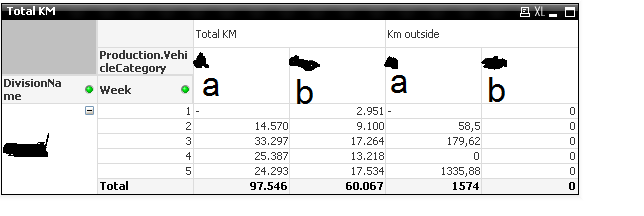
Now I got a problem. Got 2 expressions first 1 for the total km, second one for km outside.
However in my second expression there is no data for vehiclecategory B but it keeps filling it with 0's. Is it possible to solve this?
Do I need to start looking my excel? Script?
kind regards
- Tags:
- new_to_qlikview
- « Previous Replies
-
- 1
- 2
- Next Replies »

 jonathandienst
- Mark as New
- Bookmark
- Subscribe
- Mute
- Subscribe to RSS Feed
- Permalink
- Report Inappropriate Content
That's not what I had in mind. Something more like
If(Sum(Aggr(<the chart expression>, Production.VehicleCategory, Week, DivisionName)) <> 0, Production.VehicleCategory, null())
Then enable Suppress nulls for that dimension.
You might need something like Sum(TOTAL <Week, DivisionName> Aggr(...))
jonathandienst
- Mark as New
- Bookmark
- Subscribe
- Mute
- Subscribe to RSS Feed
- Permalink
- Report Inappropriate Content
My previous reply was posted before I saw your post.
So these two columns are two expressions? Then what I had in mind won't work, I am afraid. I had assumed that Total KM and Km Outside were coming from a field.
- « Previous Replies
-
- 1
- 2
- Next Replies »