Unlock a world of possibilities! Login now and discover the exclusive benefits awaiting you.

- Qlik Community
- :
- All Forums
- :
- QlikView App Dev
- :
- Expressions
- Subscribe to RSS Feed
- Mark Topic as New
- Mark Topic as Read
- Float this Topic for Current User
- Bookmark
- Subscribe
- Mute
- Printer Friendly Page

- Mark as New
- Bookmark
- Subscribe
- Mute
- Subscribe to RSS Feed
- Permalink
- Report Inappropriate Content
Expressions
Recently upgraded to V10 and I have to go through my applications and check the expressions for errors. Is there a way I can view all of the expressions that exist for a Qlikview qvw file versus select each object one by one?

 Oleg_Troyansky
- Mark as New
- Bookmark
- Subscribe
- Mute
- Subscribe to RSS Feed
- Permalink
- Report Inappropriate Content
Yes, actually. Open menu "Settings", "Expression Overview", and you get all of the expressions in one place.
I don't think there is anything that can go wrong with expressions, as a result of v10 upgrade... As far as I know, all the functions are backward-compatible, unless you upgraded from a very old version and you might still have functions like numsum()...
A sure place to watch for compatibility is VBScript/JScript macros, if you have any.
- Mark as New
- Bookmark
- Subscribe
- Mute
- Subscribe to RSS Feed
- Permalink
- Report Inappropriate Content
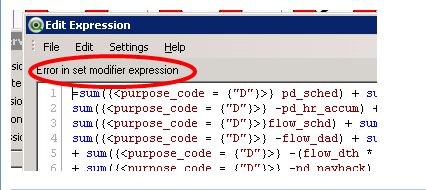
Just take it a little further, to find out if the equations has an error you have to select the equation and click on the Edit button. I was wondering if there was a way or maybe an additional column that would identify those equations rather than clicking edit on each one. This is fine for smaller applications, but larger ones with a lot of equations can be tedious. The example below shows what I mean, this is what I’m looking for otherwise it says Expression OK.
Oleg_Troyansky
- Mark as New
- Bookmark
- Subscribe
- Mute
- Subscribe to RSS Feed
- Permalink
- Report Inappropriate Content
Yes, this would be nice... Don't think it's available though. Makes a great improvement request.
cheers!
Oleg

 erichshiino
- Mark as New
- Bookmark
- Subscribe
- Mute
- Subscribe to RSS Feed
- Permalink
- Report Inappropriate Content
In version 10, I got a lot of problems with the syntax checker.
In script, the noconcatenate was not recognized.
In expression checker, some complicated set analysis with -=, and ={"=sum(something)> 10000 "} were identied as erros, althought they worked just fine.
So, for some releases, I would not believe it I get an 'Error in set modifier expression'
Regards,
Erich
Oleg_Troyansky
- Mark as New
- Bookmark
- Subscribe
- Mute
- Subscribe to RSS Feed
- Permalink
- Report Inappropriate Content
Erich,
yes, I'd agree... The syntax checker is working ok with simple expressions, but it gets easily confused with more complex ones... similar experience on versions 9 and 10...