Unlock a world of possibilities! Login now and discover the exclusive benefits awaiting you.

- Qlik Community
- :
- All Forums
- :
- QlikView App Dev
- :
- Formatting Text ( Align - RIGHT) in bar chart
- Subscribe to RSS Feed
- Mark Topic as New
- Mark Topic as Read
- Float this Topic for Current User
- Bookmark
- Subscribe
- Mute
- Printer Friendly Page

 vikasmahajan
- Mark as New
- Bookmark
- Subscribe
- Mute
- Subscribe to RSS Feed
- Permalink
- Report Inappropriate Content
Formatting Text ( Align - RIGHT) in bar chart
Dear All
I have bar chart I want to format text in left align please refer attached jpg for help.
How to format text '<b>' using this we can BOLD text , How to align right / left in qlikview.
Thanks
Vikas
If the issue is solved please mark the answer with Accept as Solution & like it.
If you want to go quickly, go alone. If you want to go far, go together.

- « Previous Replies
-
- 1
- 2
- Next Replies »

- Mark as New
- Bookmark
- Subscribe
- Mute
- Subscribe to RSS Feed
- Permalink
- Report Inappropriate Content
Hi sujit,
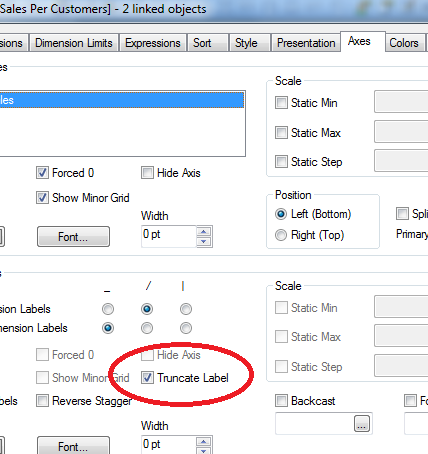
I am also using Qlikview Version 11 and I am also not able to see that Truncate Label Option
Do we have to make any changes in the Settings..?
see the attached image

- Mark as New
- Bookmark
- Subscribe
- Mute
- Subscribe to RSS Feed
- Permalink
- Report Inappropriate Content
Hi Vikas,
To my knowledge, you can only use HTML code on expressions to make it as Bold.
Go to expression -> click on '+' sign left side to the expression.
Click on the 3 rd option 'Text Format' from the drop down menu.
and enter the same <b> for bold, <i> for italic .......
Hope this helps you.
Regards,
Pavan.

 sujeetsingh
- Mark as New
- Bookmark
- Subscribe
- Mute
- Subscribe to RSS Feed
- Permalink
- Report Inappropriate Content
Hi Ravi seems it is not in Qv11. But i am too using Qv11 sr3
Try Sttings >>>Document Properties>>> Presentation
sujeetsingh
- Mark as New
- Bookmark
- Subscribe
- Mute
- Subscribe to RSS Feed
- Permalink
- Report Inappropriate Content
Gentleman if this long thread helped you or satisfied you so update the fact as helpful.
- Mark as New
- Bookmark
- Subscribe
- Mute
- Subscribe to RSS Feed
- Permalink
- Report Inappropriate Content
Hi Ravi,
Which SR of QV 11 you are using?
--
Vinoth
- Mark as New
- Bookmark
- Subscribe
- Mute
- Subscribe to RSS Feed
- Permalink
- Report Inappropriate Content
Hi ,
Qlikview 11.00.11149.0 IR
(Personal Edition)
---
Ravikant
- Mark as New
- Bookmark
- Subscribe
- Mute
- Subscribe to RSS Feed
- Permalink
- Report Inappropriate Content
Hi Ravi,
QV 11 IR is not having much functions/opritons including Truncate Label.
Suggest you to install the latest QV 11.2 SR4 and test the same.
--
Vinoth

 israrkhan
- Mark as New
- Bookmark
- Subscribe
- Mute
- Subscribe to RSS Feed
- Permalink
- Report Inappropriate Content
Hi, Ravikant
its bar chart, qlikview 11.2 sr3..
see the image, make sure you have set styling Mode to Advance, in Document Properties.
- Mark as New
- Bookmark
- Subscribe
- Mute
- Subscribe to RSS Feed
- Permalink
- Report Inappropriate Content
Thank you IsraKhan....!
- Mark as New
- Bookmark
- Subscribe
- Mute
- Subscribe to RSS Feed
- Permalink
- Report Inappropriate Content
Thanks IsrarKahn! This solved a problem I was having with alignment.
- « Previous Replies
-
- 1
- 2
- Next Replies »