Unlock a world of possibilities! Login now and discover the exclusive benefits awaiting you.

Announcements
Save an extra $150 Dec 1–7 with code CYBERWEEK - stackable with early bird savings: Register
- Qlik Community
- :
- All Forums
- :
- QlikView App Dev
- :
- How to change tab look and feel
Options
- Subscribe to RSS Feed
- Mark Topic as New
- Mark Topic as Read
- Float this Topic for Current User
- Bookmark
- Subscribe
- Mute
- Printer Friendly Page
Turn on suggestions
Auto-suggest helps you quickly narrow down your search results by suggesting possible matches as you type.
Showing results for

Not applicable
2012-04-10
01:52 AM
- Mark as New
- Bookmark
- Subscribe
- Mute
- Subscribe to RSS Feed
- Permalink
- Report Inappropriate Content
How to change tab look and feel
Hi all,
I saw in different sample that the look of the tab can vary from one sample to another
the standard one:
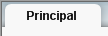
another i saw:

But I don't find where in qlikview I can setup the document parameter to choose on or another.
Thanks in advance for you help
- Tags:
- new_to_qlikview
1,595 Views
1 Solution
Accepted Solutions
Not applicable
2012-04-10
03:07 AM
Author
- Mark as New
- Bookmark
- Subscribe
- Mute
- Subscribe to RSS Feed
- Permalink
- Report Inappropriate Content
Go to Document properties=> General Tab ==> Choose Tabrow Style Oblique
2 Replies
Not applicable
2012-04-10
03:07 AM
Author
- Mark as New
- Bookmark
- Subscribe
- Mute
- Subscribe to RSS Feed
- Permalink
- Report Inappropriate Content
Go to Document properties=> General Tab ==> Choose Tabrow Style Oblique
Not applicable
2012-04-10
07:33 AM
Author
- Mark as New
- Bookmark
- Subscribe
- Mute
- Subscribe to RSS Feed
- Permalink
- Report Inappropriate Content
Many thanks Yogesh
706 Views