Unlock a world of possibilities! Login now and discover the exclusive benefits awaiting you.

- Qlik Community
- :
- All Forums
- :
- QlikView App Dev
- :
- How to show previos appearance before the last - w...
- Subscribe to RSS Feed
- Mark Topic as New
- Mark Topic as Read
- Float this Topic for Current User
- Bookmark
- Subscribe
- Mute
- Printer Friendly Page

 yanivvl0
- Mark as New
- Bookmark
- Subscribe
- Mute
- Subscribe to RSS Feed
- Permalink
- Report Inappropriate Content
How to show previos appearance before the last - with(out) selection ?
hi to all , I summarize in the text box the units where year = 2016 and Category = 4, by clicking it i am activating a selection according to this 2 fields. Once selected i need to see the last status (by model_Proj_STATUS_NUMBER in descending order) - so far no problems, but when I want to see the status before him - WITHOUT consideration of year and Category I get nothing :

The Requested values below are highlighted in yellow:
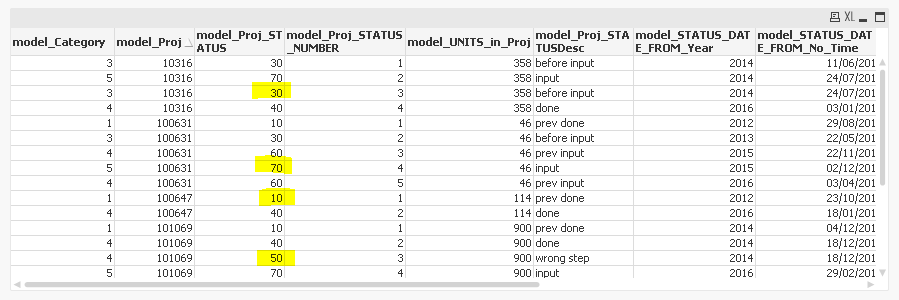
you can use the attach QVW.
THANKS!!
- « Previous Replies
-
- 1
- 2
- Next Replies »

 sunny_talwar
- Mark as New
- Bookmark
- Subscribe
- Mute
- Subscribe to RSS Feed
- Permalink
- Report Inappropriate Content
I am not sure as well on what you are trying to achieve. Would you be able to provide the output in a table form with and without the selections?

 perumal_41
- Mark as New
- Bookmark
- Subscribe
- Mute
- Subscribe to RSS Feed
- Permalink
- Report Inappropriate Content
Try below
FirstSortedValue ( {<model_STATUS_DATE_FROM_Year= , model_Category= >} model_Proj_STATUS , model_Proj_STATUS_NUMBER,2 )
yanivvl0
- Mark as New
- Bookmark
- Subscribe
- Mute
- Subscribe to RSS Feed
- Permalink
- Report Inappropriate Content
hi again Sunny , i think your answer is GOOD !! i got confuse , it seems to work OK !!
yanivvl0
- Mark as New
- Bookmark
- Subscribe
- Mute
- Subscribe to RSS Feed
- Permalink
- Report Inappropriate Content
hi Maxim , You're right, I just had to digest the process of calculation - THANKS !!
yanivvl0
- Mark as New
- Bookmark
- Subscribe
- Mute
- Subscribe to RSS Feed
- Permalink
- Report Inappropriate Content
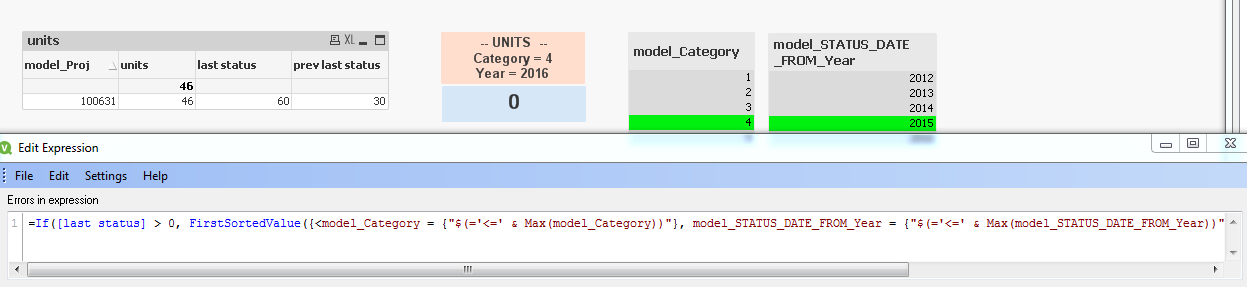
hi Sunny , I hope you do not mind to take a look in one more question related to the discussion, is it possible to eliminate the projects ( "model_Proj" ) that do not have a case of the year = 2015 Category = 4, in other words where the "last status" is NULL. Again - many thanks!
sunny_talwar
- Mark as New
- Bookmark
- Subscribe
- Mute
- Subscribe to RSS Feed
- Permalink
- Report Inappropriate Content
Try this expression:
=If([last status] > 0, FirstSortedValue({<model_Category = {"$(='<=' & Max(model_Category))"}, model_STATUS_DATE_FROM_Year = {"$(='<=' & Max(model_STATUS_DATE_FROM_Year))"}>} model_Proj_STATUS , -model_Proj_STATUS_NUMBER, 2))
yanivvl0
- Mark as New
- Bookmark
- Subscribe
- Mute
- Subscribe to RSS Feed
- Permalink
- Report Inappropriate Content
AMAZING ! i did not know that in QV there is a possible to ask about any expression from another expression ,
you are a good teacher , and exelant developper !!

- « Previous Replies
-
- 1
- 2
- Next Replies »