Unlock a world of possibilities! Login now and discover the exclusive benefits awaiting you.

- Qlik Community
- :
- All Forums
- :
- QlikView App Dev
- :
- Re: Ignoring dimension in pivot table
- Subscribe to RSS Feed
- Mark Topic as New
- Mark Topic as Read
- Float this Topic for Current User
- Bookmark
- Subscribe
- Mute
- Printer Friendly Page

 avinashkk696
- Mark as New
- Bookmark
- Subscribe
- Mute
- Subscribe to RSS Feed
- Permalink
- Report Inappropriate Content
Ignoring dimension in pivot table
Hi Guys,
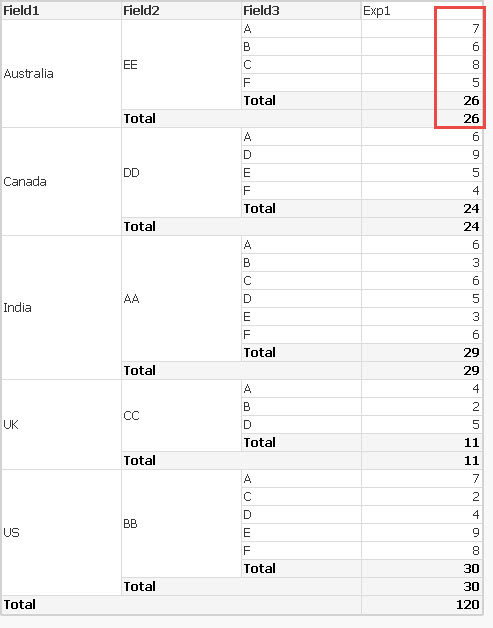
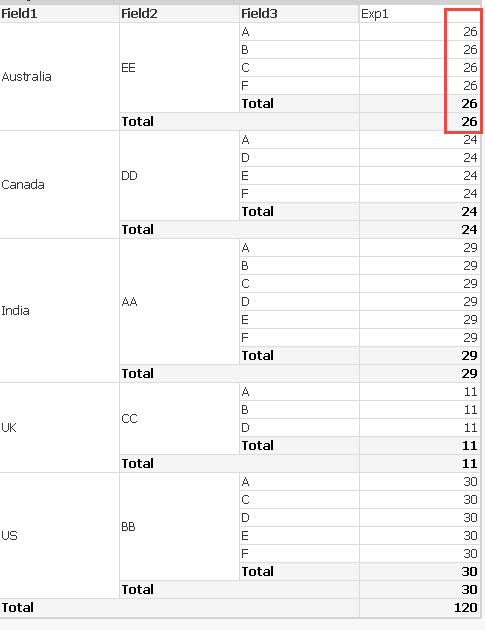
I have a problem with the pivot table. I have three dimensions and a expression. I want the expression to aggregate on all the dimensions except one dimension. Please see the screenshots below.
Current Pivot Table value:
Expected Output:
Thanks in advance....

 zhadrakas
- Mark as New
- Bookmark
- Subscribe
- Mute
- Subscribe to RSS Feed
- Permalink
- Report Inappropriate Content
maybe this
sum(TOTAL <Field1, Field2>Field4)


- Mark as New
- Bookmark
- Subscribe
- Mute
- Subscribe to RSS Feed
- Permalink
- Report Inappropriate Content
Look for TOTAL Qualifer What does the TOTAL qualifier do?
avinashkk696
- Mark as New
- Bookmark
- Subscribe
- Mute
- Subscribe to RSS Feed
- Permalink
- Report Inappropriate Content
Thanks you for your reply.
We can ignore dimensions using total if we have less number of dimensions. In my real scenario, I have many dimensions, I can not include all the dimensions in total. Is it possible to do it in any other way than including the dimensions in total??? I tried using variable in total concatenating all the dimension names. But getting an error.
zhadrakas
- Mark as New
- Bookmark
- Subscribe
- Mute
- Subscribe to RSS Feed
- Permalink
- Report Inappropriate Content
you can do that in a dynamic way:
i tested with this script:
MyDimensions:
LOAD * INLINE [
MyDimensions
Field1
Field2
];
RAW:
LOAD * INLINE [
Field1, Field2, Field3, Field4
India, AA, A, 2
India, AA, B, 3
India, AA, A, 4
India, AA, D, 5
India, AA, C, 6
India, AA, F, 6
India, AA, E, 3
US, BB, A, 7
US, BB, D, 4
US, BB, C, 2
US, BB, F, 8
US, BB, E, 9
UK, CC, A, 1
UK, CC, B, 2
UK, CC, A, 3
UK, CC, D, 5
Canada, DD, F, 4
Canada, DD, E, 5
Canada, DD, A, 6
Canada, DD, D, 9
Australia, EE, C, 8
Australia, EE, F, 5
Australia, EE, B, 6
Australia, EE, A, 7
];
Then i Created a variable
vDimensions
=Concat(MyDimensions, ',')
Try Expression like this
sum(TOTAL <$(vDimensions)> Field4)


 Clever_Anjos
- Mark as New
- Bookmark
- Subscribe
- Mute
- Subscribe to RSS Feed
- Permalink
- Report Inappropriate Content
Maybe with
IF(Field1='Australia' and Field2='EE',
sum(total <Field1,Field2>Expr1),
Sum(Expr1)
)
