Unlock a world of possibilities! Login now and discover the exclusive benefits awaiting you.

- Qlik Community
- :
- All Forums
- :
- QlikView App Dev
- :
- List box Expression
- Subscribe to RSS Feed
- Mark Topic as New
- Mark Topic as Read
- Float this Topic for Current User
- Bookmark
- Subscribe
- Mute
- Printer Friendly Page

- Mark as New
- Bookmark
- Subscribe
- Mute
- Subscribe to RSS Feed
- Permalink
- Report Inappropriate Content
List box Expression
Hi all,
what to do if I want to add or delete values from list box for next customized report .For example see following Image,Here have to delete Connection Number,Meter Status and add Debit amount for next report.Can anyone help.
.png)
Accepted Solutions

 anbu1984
- Mark as New
- Bookmark
- Subscribe
- Mute
- Subscribe to RSS Feed
- Permalink
- Report Inappropriate Content
If you have loaded _Dimension through Inline load, then add dimension "Debit Amount" in Inline load
If you don't want to ignore few dimensions, then try like this
=If(Not Match(_Dimension ,'Connection Number','Meter Status'),_Dimension)
anbu1984
- Mark as New
- Bookmark
- Subscribe
- Mute
- Subscribe to RSS Feed
- Permalink
- Report Inappropriate Content
If you have loaded _Dimension through Inline load, then add dimension "Debit Amount" in Inline load
If you don't want to ignore few dimensions, then try like this
=If(Not Match(_Dimension ,'Connection Number','Meter Status'),_Dimension)
- Mark as New
- Bookmark
- Subscribe
- Mute
- Subscribe to RSS Feed
- Permalink
- Report Inappropriate Content
Hi anbu,
It's showing like this, What to do?.png)
anbu1984
- Mark as New
- Bookmark
- Subscribe
- Mute
- Subscribe to RSS Feed
- Permalink
- Report Inappropriate Content
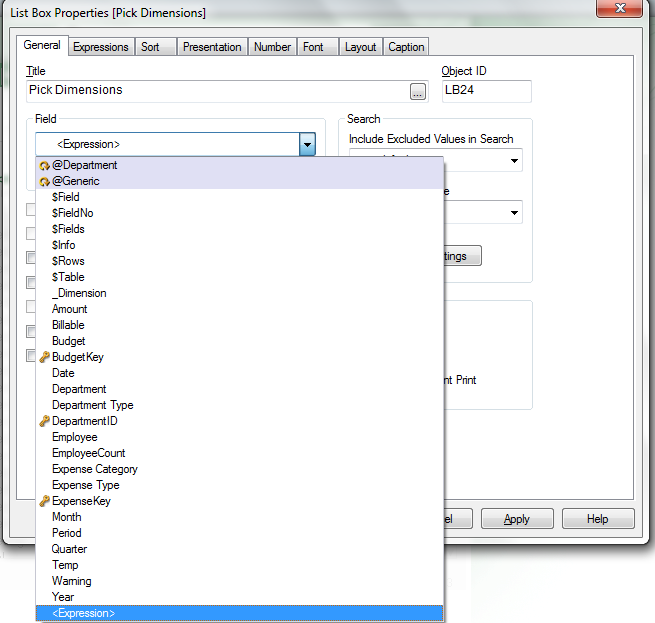
You added above expression in expression tab. Remove that and add it in General tab. Select Field drop down in General tab and select last <Expression> and add the expression here.
- Mark as New
- Bookmark
- Subscribe
- Mute
- Subscribe to RSS Feed
- Permalink
- Report Inappropriate Content
Thank you Anbu ,Its working...