Unlock a world of possibilities! Login now and discover the exclusive benefits awaiting you.

- Qlik Community
- :
- All Forums
- :
- QlikView App Dev
- :
- Re: Master Calendar Interval () step error
- Subscribe to RSS Feed
- Mark Topic as New
- Mark Topic as Read
- Float this Topic for Current User
- Bookmark
- Subscribe
- Mute
- Printer Friendly Page

 jleefjcapital
- Mark as New
- Bookmark
- Subscribe
- Mute
- Subscribe to RSS Feed
- Permalink
- Report Inappropriate Content
Master Calendar Interval () step error
Hello,
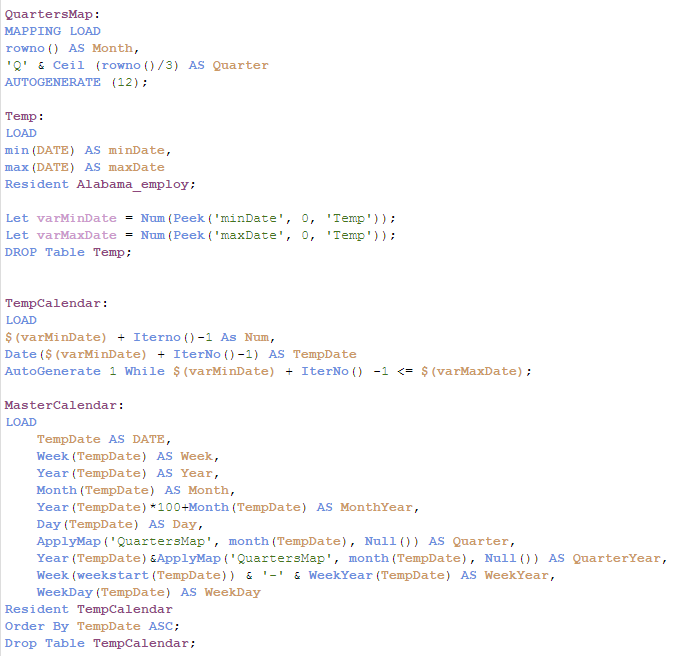
I'm using the following code for the master calendar. It had worked with no problem with other data sets, but I get the following error message, when I try to use it with a particular data table (Alabama_employ).
I hope someone would be able to help me.
Thank you,
Jessica
Error message when I try to load:

Here is the master calendar code I'm using:
Here is the table I'm referencing:

- « Previous Replies
- Next Replies »
jleefjcapital
- Mark as New
- Bookmark
- Subscribe
- Mute
- Subscribe to RSS Feed
- Permalink
- Report Inappropriate Content
That where statement was auto generated when we established the REST connection. It doesn't work without it.

 sunny_talwar
- Mark as New
- Bookmark
- Subscribe
- Mute
- Subscribe to RSS Feed
- Permalink
- Report Inappropriate Content
I have never worked with REST connection before so won't really know its limitation.
jleefjcapital
- Mark as New
- Bookmark
- Subscribe
- Mute
- Subscribe to RSS Feed
- Permalink
- Report Inappropriate Content
It works, but how do I format date into MonthYear?
For instance, Jan2010 using the statement below-
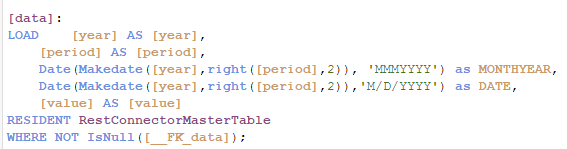
Date(Makedate([year],right([period],2)), 'MMMYYYY') as MONTHYEAR,
sunny_talwar
- Mark as New
- Bookmark
- Subscribe
- Mute
- Subscribe to RSS Feed
- Permalink
- Report Inappropriate Content
What you have below should have worked and should show your Jan2010 for year = 2010 and Month = 01
jleefjcapital
- Mark as New
- Bookmark
- Subscribe
- Mute
- Subscribe to RSS Feed
- Permalink
- Report Inappropriate Content
Sunny,
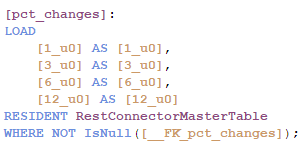
There are two load statements generated as follows. The first load statement provides the % changes while the second one provides levels. The levels are associated with dates, but how do I link the % change with the corresponding dates?
I've tried adding the date fields in the %-change load statement, but it didn't work.
sunny_talwar
- Mark as New
- Bookmark
- Subscribe
- Mute
- Subscribe to RSS Feed
- Permalink
- Report Inappropriate Content
Are there any common fields between the two? How do you know which % belong to what date?
jleefjcapital
- Mark as New
- Bookmark
- Subscribe
- Mute
- Subscribe to RSS Feed
- Permalink
- Report Inappropriate Content
I know it's ordered by date, because I've verified on line via a HTML table. I'm not sure how to add the date.

- « Previous Replies
- Next Replies »