Unlock a world of possibilities! Login now and discover the exclusive benefits awaiting you.

- Qlik Community
- :
- All Forums
- :
- QlikView App Dev
- :
- Re: Master Calendar
- Subscribe to RSS Feed
- Mark Topic as New
- Mark Topic as Read
- Float this Topic for Current User
- Bookmark
- Subscribe
- Mute
- Printer Friendly Page

 slribeiro
- Mark as New
- Bookmark
- Subscribe
- Mute
- Subscribe to RSS Feed
- Permalink
- Report Inappropriate Content
Master Calendar
QuartersMap:
MAPPING LOAD
rowno() as Month,
'T' & Ceil (rowno()/3) as Quarter
AUTOGENERATE (12);
TempCalendarRange:
LOAD
date('01/01/2014') as MinDate,
date('31/12/2016') as MaxDate
Resident MainTable;
Let vMinDate = Num(Peek('MinDate', 0, 'TempCalendarRange'));
Let vMaxDate = Num(Peek('MaxDate', 0, 'TempCalendarRange'));
DROP Table TempCalendarRange;
TempCalendar:
LOAD Distinct
$(vMinDate) + IterNo()-1 as Num,
Date($(vMinDate) + IterNo() - 1) as TempDate
AutoGenerate (1)
While $(vMinDate) + IterNo() -1 <= $(vMaxDate);
MasterCalendar:
LOAD
TempDate,
week(TempDate) as Week,
Year(TempDate) as Year,
Month(TempDate) as Month,
Day(TempDate) as Day,
YeartoDate(TempDate)*-1 as CurYTDFlag,
YeartoDate(TempDate,-1)*-1 as LastYTDFlag,
inyear(TempDate, Monthstart($(varMaxDate)),-1) as RC12,
date(monthstart(TempDate), 'MMM-YYYY') as MonthYear,
ApplyMap('QuartersMap', month(TempDate), Null()) as Quarter,
Week(weekstart(TempDate)) & '-' & WeekYear(TempDate) as WeekYear,
WeekDay(TempDate) as WeekDay
Resident TempCalendar
Order By TempDate ASC;
Drop Table TempCalendar;
It's giving an error as if the variable vMaxDate is not created!
Can anyone see something wrong with this script?
Regards
Simão Ribeiro
- Tags:
- new_to_qlikview
slribeiro
- Mark as New
- Bookmark
- Subscribe
- Mute
- Subscribe to RSS Feed
- Permalink
- Report Inappropriate Content
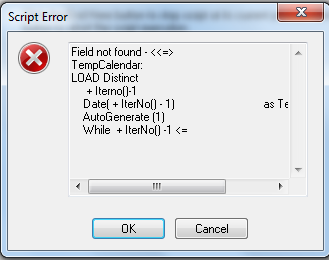
This is the error that appears to me...
Help me please

 swuehl
- Mark as New
- Bookmark
- Subscribe
- Mute
- Subscribe to RSS Feed
- Permalink
- Report Inappropriate Content
What is your default date format? 'MM/DD/YYYY' or 'DD/MM/YYYY'? Only one is matching the MaxDate...
swuehl
- Mark as New
- Bookmark
- Subscribe
- Mute
- Subscribe to RSS Feed
- Permalink
- Report Inappropriate Content
Both variables do not seem set correctly, so you need to first correct for this.
Maybe start with
/* commented out
TempCalendarRange:
LOAD
date('01/01/2014') as MinDate,
date('31/12/2016') as MaxDate
Resident MainTable;
*/
Let vMinDate = Num(Makedate(2014,1,1) );
Let vMaxDate = Num(Makedate(2016,12,31) );
//DROP Table TempCalendarRange;

 ElizaF
- Mark as New
- Bookmark
- Subscribe
- Mute
- Subscribe to RSS Feed
- Permalink
- Report Inappropriate Content
Depending on how you configured is variable DateFormat at the beginning of the script.
SET DateFormat='DD/MM/YYYY';
If not configured, then it is the Date Format of the regional setting
