Unlock a world of possibilities! Login now and discover the exclusive benefits awaiting you.

- Qlik Community
- :
- All Forums
- :
- QlikView App Dev
- :
- Re: Max identifier
- Subscribe to RSS Feed
- Mark Topic as New
- Mark Topic as Read
- Float this Topic for Current User
- Bookmark
- Subscribe
- Mute
- Printer Friendly Page

 keithlawrence
- Mark as New
- Bookmark
- Subscribe
- Mute
- Subscribe to RSS Feed
- Permalink
- Report Inappropriate Content
Max identifier
I'm trying to show the maximum occupancy of a building in a table. This is my data:
Building Number, Size, Occupant
1, 10, A
1, 8, B
1, 6, C
2, 5, A
2, 6, B
3, 10, A
3, 6, B
3, 8 C
I have table grouped by Building Number and I want to show the largest occupier of that building. I want to see this:
Building, Largest tenant
1, A
2, B
3, A
I have a syntax that works out the largest tenant but it only populates when I have one building selected. I can't get them all to be shown in a table for some reason.
Any help?
Accepted Solutions

 sunny_talwar
- Mark as New
- Bookmark
- Subscribe
- Mute
- Subscribe to RSS Feed
- Permalink
- Report Inappropriate Content
No problem. Here is another way you can do it, just in case you find this more useful.
Script (creating flags)
Table:
LOAD * Inline [
Building Number, Size, Occupant
1, 10, A
1, 8, B
1, 6, C
2, 5, A
2, 6, B
3, 10, A
3, 6, B
3, 8, C
];
Join(Table)
LOAD [Building Number],
Max(Size) as Size,
'1' as Flag
Resident Table
Group By [Building Number];
Table Box
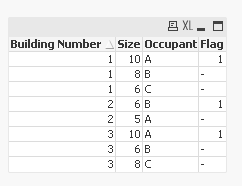
Straight Table
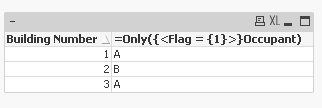
Dimension: [Building Number]
Expression: =Only({<Flag = {1}>}Occupant)
Best,
Sunny
sunny_talwar
- Mark as New
- Bookmark
- Subscribe
- Mute
- Subscribe to RSS Feed
- Permalink
- Report Inappropriate Content
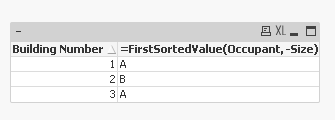
Try this:
Dimension: [Building Number]
Expression: =FirstSortedValue(Occupant, -Size)
Output
keithlawrence
- Mark as New
- Bookmark
- Subscribe
- Mute
- Subscribe to RSS Feed
- Permalink
- Report Inappropriate Content
Works a dream! Thanks Sunny
sunny_talwar
- Mark as New
- Bookmark
- Subscribe
- Mute
- Subscribe to RSS Feed
- Permalink
- Report Inappropriate Content
No problem. Here is another way you can do it, just in case you find this more useful.
Script (creating flags)
Table:
LOAD * Inline [
Building Number, Size, Occupant
1, 10, A
1, 8, B
1, 6, C
2, 5, A
2, 6, B
3, 10, A
3, 6, B
3, 8, C
];
Join(Table)
LOAD [Building Number],
Max(Size) as Size,
'1' as Flag
Resident Table
Group By [Building Number];
Table Box
Straight Table
Dimension: [Building Number]
Expression: =Only({<Flag = {1}>}Occupant)
Best,
Sunny

 sasiparupudi1
- Mark as New
- Bookmark
- Subscribe
- Mute
- Subscribe to RSS Feed
- Permalink
- Report Inappropriate Content
x:
load * Inline
[
Building Number, Size, Occupant
1, 10, A
1, 8, B
1, 6, C
2, 5, A
2, 6, B
3, 10, A
3, 6, B
3, 8, C
];
MAP:
Mapping LOAD
[Building Number] & Size as MapKey,Occupant
Resident x;
x1:
NoConcatenate load [Building Number] , max(Size) as Size,ApplyMap('MAP',[Building Number]&max(Size),'N/A') as Occupant
Resident x
Group by [Building Number];
drop Table x;
 Kushal_Chawda
- Mark as New
- Bookmark
- Subscribe
- Mute
- Subscribe to RSS Feed
- Permalink
- Report Inappropriate Content
hi sunindia ,
when there is same size of Two Occupant , Firstsorted value will not work.
then need to follow another way.
sunny_talwar
- Mark as New
- Bookmark
- Subscribe
- Mute
- Subscribe to RSS Feed
- Permalink
- Report Inappropriate Content
Kush you are right, but that is assuming that Keith would want to see both of them. I actually provided the response in the context of things. Making assumptions can complicate matters 
Best,
Sunny
sunny_talwar
- Mark as New
- Bookmark
- Subscribe
- Mute
- Subscribe to RSS Feed
- Permalink
- Report Inappropriate Content
Also if you look at the my second response, that should take care of two max values
