Unlock a world of possibilities! Login now and discover the exclusive benefits awaiting you.

- Qlik Community
- :
- All Forums
- :
- QlikView App Dev
- :
- Need HELP ! Rows to Columns ?
- Subscribe to RSS Feed
- Mark Topic as New
- Mark Topic as Read
- Float this Topic for Current User
- Bookmark
- Subscribe
- Mute
- Printer Friendly Page

 markticoy
- Mark as New
- Bookmark
- Subscribe
- Mute
- Subscribe to RSS Feed
- Permalink
- Report Inappropriate Content
Need HELP ! Rows to Columns ?
Good Day Mates !
I'm sorry if I am using a wrong title for this thread, but I'll explain what my question is all about.
I have a data, source is excel. My problem is that my fields are displayed or arrange in a row. see the picture for reference

Now what I want is, convert this rows to columns. My desired result will be shown below.
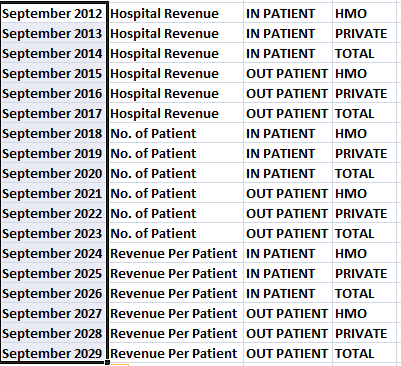
Now, is there a way to achieve this kind of result ?

 SunilChauhan
- Mark as New
- Bookmark
- Subscribe
- Mute
- Subscribe to RSS Feed
- Permalink
- Report Inappropriate Content
change table to pivot to straight
or drag column from horizontal to vertical in pivot table it self
hope this helps

 sujeetsingh
- Mark as New
- Bookmark
- Subscribe
- Mute
- Subscribe to RSS Feed
- Permalink
- Report Inappropriate Content
Follow this, you need to use Generic load
markticoy
- Mark as New
- Bookmark
- Subscribe
- Mute
- Subscribe to RSS Feed
- Permalink
- Report Inappropriate Content
Thank you mates for ideas. I'll be studying your suggestions tonight.

 rajeshvaswani77
- Mark as New
- Bookmark
- Subscribe
- Mute
- Subscribe to RSS Feed
- Permalink
- Report Inappropriate Content
Hi,
Change to Pivot table and left click and drag the column to the header till you see a blue arrow pointing.
Un-click here and let it drop. The transpose would have happened.
thanks,
Rajesh Vaswani
